Solution designer with Firstsource solutions. A post grad in Networks and IT Infrastructure. Technology enthusiast, blogger, webdesigner, Network security aspirant and in love with electronics and gadgets. This blog is an attempt to share what I find interesting... almost anything @Mtaram on twitter and Google+
Gmail Labs continues to make an awesome product even better. Tonight the site has introduced ‘Sender time zone’, a feature that allows users to quickly tell if their contact is likely awake or sound asleep, based on the time zone their Emails are being sent from. The feature takes advantage of the time zone data often included in Email headers, showing a green light for contacts that are probably awake and a red one for those that are asleep. For those of us who live and die by our inboxes, it can be tough to keep track of the contacts that are abroad, which can lead to some awkward phone calls (I’ve accidentally called CEOs of startups located in the UK at around 4 in the morning, their time). The feature is also helpful for determining how quickly you can expect an Emailed response from your contact (again, I’ve sent urgent messages to PR representatives who were based abroad). As with all Google Labs features (other notables include a Panic Button and Multi-Pane Viewing) users can access the feature by enabling Google Labs through their Gmail settings, then selecting ‘Sender Time Zone’.
Tata nano has proved to be luck for me. My first post about Nano was last year on January 26 when I was travelling in train for my MBA admissions process. I got a mail from one of my best friends Sachu who is an ASM with Samsung. The mail inspired me to write about the car and its competetors. Its been a long story from there on and the hits on my posts have been increasing but the number of hits on Tata nano article were overwhelming… more than 800 hits on a single post in a day… Its too much for me… I am elated… hope this kind of response continue.
The wonder car of the aam admi (common man) from the TATA Motors stables is finally in the public domain.
After being shuttled around through the country the six-year-old dream of Ratan Tata is finally here and the man finally looked a more content self.
“Today is another memorable day. It has been a long journey,” says Ratan Tata.
From the glitterati to the common man and even the international media, everyone wanted to be a part of it. But all those who expected a cheap and a rugged four-wheeler were in for a surprise.
The base model comes for around Rs 1,30,000 while the costliest one is for Rs1,72,000.
The car is being eyed by not only the common man but also the who’s who of the country who have made it to the first elusive one lakh customer’s list
The launch of India’s small car Tata Nano made big news in the United States with top publications from Time magazine to the New York Times giving the story a big splash.
Tata nano the much awaited people’s car is all set to roll out on march 23 2009. Nano is all set to break all sales and booking records and the gurus are already comparing it to the Ford model T. People have been waiting for it very eagerly and now that the launched date has been announced they can’t wait any further.
Despite the economic slowdown the Tatas have managed to do what they had said. Earlier this year there were speculations that nano might roll out in the first quarter but also there were speculations that it might get delayed too.
Now we have the nano and apart from that Tata has a big line up for the days ahead. Following nano will be the Fiat Grande Punto in June, Tata X-over due in last quarter 2009, Tata Safari all new models, Fiat Bravo, Tata Indigo and many others…
Did you ever wonder that you had bought a 120 GB HDD but the computer showed it as a 111 GB HDD. And where did the rest of the space eventually disappear? Well nothing disappeared and even the manufacturer didnt make a fool of you.
This happens because there is a slight difference between the way the computer and the manufacturer calculate the HDD size.
I have been a fan of the Mac OS ever since i cam to know about it. When i got my first computer I tried my best to make the windows look like mac but it was not upto my expectations and buys a mac was not an option for me. Then came the OSX86 project and it made my dream come true. I started experimenting with OSX 10.4.8 and kept trying to get it working on my Minimachine [xps 1210]. It took me around 6 months and several GBs of downloads to get tit to work.
I joined college for MBA and the Mac os in its latest flavour named the leopard was with me till i had to let go of it to install Linux because I had never thought that I would be installing 3 OSs simultameously and it went on like that for 6 more months and i was without mac os. Today I reinstalled macosx 10.5.2 and it jsut didnt boot as I had Ubuntu too installed previously and i got the Grub error…
Then I did the following to fix grub and added an entry into grub for booting macosx…
How to fix grub….
1. Boot the Desktop/Live CD. (Use Ubuntu 8.04 or later)

2. Open a terminal (Applications -> Accessories -> Terminal)

3. Start grub as root with the following command :

     sudo grub

4. You will get a grub prompt (see below) which we will use to find the root partition and install grub to the MBR (hd0)

         [ Minimal BASH-like line editing is supported.   For
         the   first   word,  TAB  lists  possible  command
         completions.  Anywhere else TAB lists the possible
         completions of a device/filename. ]

grub>

Type the following and press enter:

find /boot/grub/stage1

If you get "Error 15: File not found", try the following:

find /grub/stage1

Using this information, set the root device (fill in X,Y with whatever the find command returned):

grub> root (hd0,3) // for me it was (hd0,3)

Install Grub:

grub> setup (hd0)

Exit Grub:

grub> quit

Boot into Ubuntu

Open Terminal and run this command.

" sudo gedit /boot/grub/menu.lst "
it will allow to configure your boot order.

3) Edit your OSX in Editor Window.

title OSX86

root (hd0,0) " Replace with your Partition of OSX "

chainloader +1
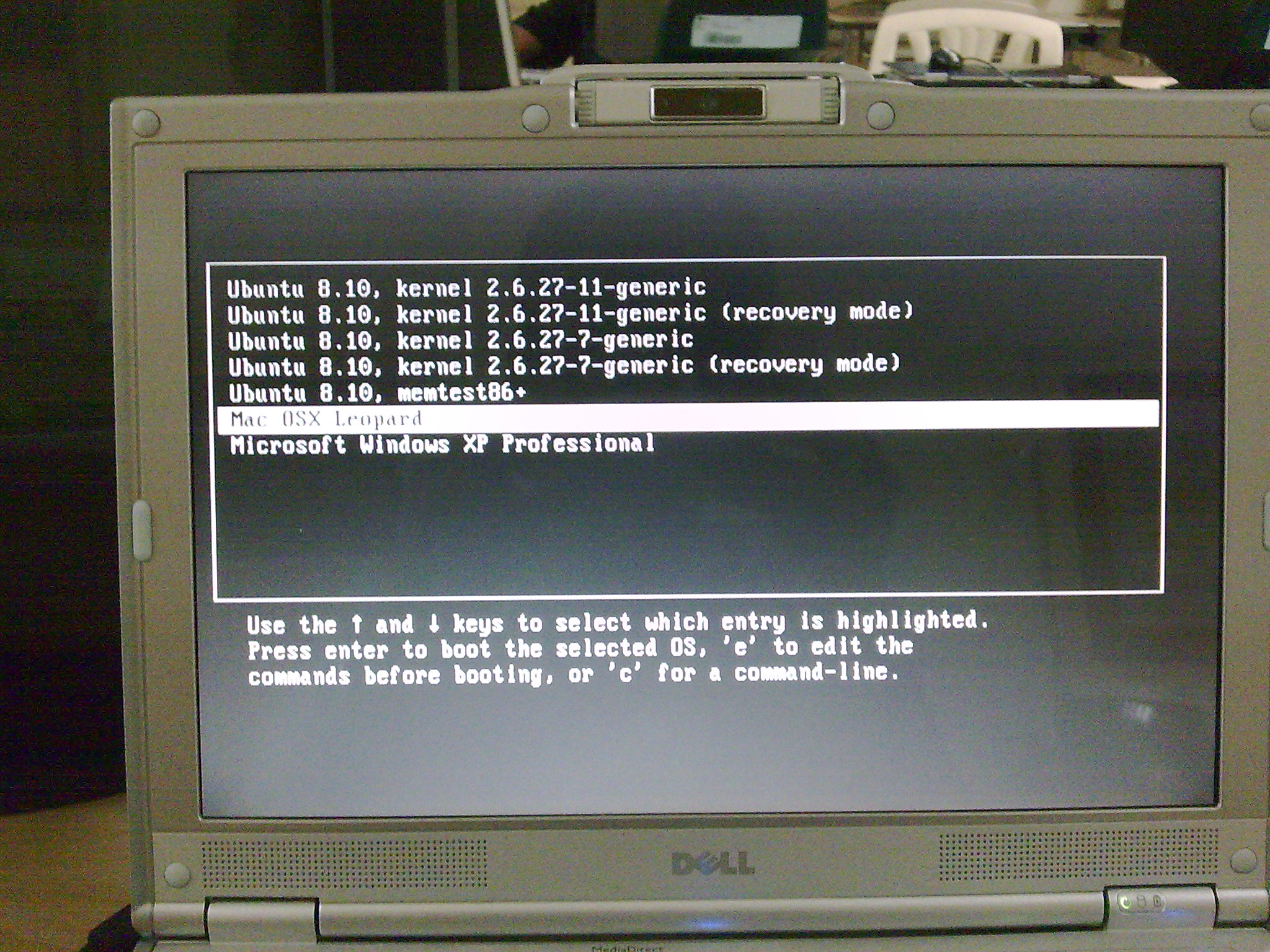
Now Grub lets me choose which os to boot….
Ubuntu
Leopard
Windows XP
Grub on minimachine
when i chose leopard I am presented with the Darwinx86 booot loader which presents to me all partitions to boot from an if i choose Linux from Darwin then i again get back to Grub…. 🙂
Darwin boot loader on minimachine
I just can keep switching between boot loaders and boot any os that I want….
The existing issues of single core only and no camera and card reader and no shut down still bug me… The shutdown and sleep had worked for me at times but not always.
There are unleashed talents waiting to sprout, tired rainmakers who are striving for an opportunity to start their own ventures and there are some truly enlighten souls who believe they have something more to offer in this world.
If you aspire to own your competitive advantage, challenge the conventional thinking and be a part of revolution and want to be a trailblazer in the Information Technology and Management field, look no further than Information Technology Entrepreneurship and Leadership Forum (ITELF) at SCIT. We provide an opportunity to discover and nurture the entrepreneurial spirits.
SCIT is known for creating global IT professionals who are trained to be leaders and unleash their entrepreneurial spirit.ITELF is an endeavor of SCIT that works as a catalyst for nurturing entrepreneurial talents; it is also a resource centre creating awareness relating to entrepreneurship and leadership in education and also providing direction relating to entrepreneurship development and management.
We welcome the alliances with government department, industry, professional bodies like NASSCOM, the national entrepreneurship network, The Indus Entrepreneurs (TiE), Academia world and other independent entrepreneurs. Queries and expression of interests can be sent at itelf@scit.edu.
Co ordinators
Saurabh Mishra [9730081077], Kanupriya Kejriwal [9730081817] and Ranjeet Mohan [9922369417].
Got an opportunity to have breakfast with Mozilla guys run Ranganathan, Mozilla Tech Evangelist, and Seth Bindernagel, Director of Localization for Mozilla and attend a session. I never knew that there was so much more with Mozilla other than the Firefox. Mozilla firefox is just the tip of the ice berg and in firefox too there is loot more under the hood than meets the eye.
Seth majorly talked about the Mozilla business model and where they generate the revenue from. He also talked about the various application developed on the Mozilla platform and gave us some quick demonstration.
Arun showed us the major of the tech stuff and how the video is becoming the mainstream content for the web and how javasript has evolved from being considered a toy language to a powerful scripting language that can help the browsers in providing a never before experience to the end user. Arun also showed us a demonstration on Bespin which is a web based IDE and Scalar vector graphics for the web.
The crowd consisted of Mozilla fans aging under a year to people in late 40s.
Also got to meet Amit, the peron behind One Laptop per Child – India initiative.
In all it was an awesome experience for me. Detailed write up for the event coming up soon.
As you might know Twitter accepts more than just basic text. The service is UTF8 compatible which means that instead of tweeting “I love you” you could just as well use “I ♥ you”. Or how about this:
“I’m going to ✈ to ☭ in the morning after I make a ☎ to make sure my ♂ is ✔ with it. ✌ for now and don’t forget to ✍ and lets have ♨ soon!”
♥
✈
☺
♬
☑
♠
☎
☻
♫
☒
♤
☤
☹
♪
♀
✩
✉
☠
✔
♂
★
✇
♺
✖
♨
❦
☁
✌
♛
❁
☪
☂
✏
♝
❀
☭
☃
☛
♞
✿
☮
☼
☚
♘
✾
☯
☾
☝
♖
✽
✝
☄
☟
♟
✺
☥
✂
✍
♕
✵
But how do you remember all these damn characters?
Aha!
TwitterKeys is a small tool we (@boris & @sandervdv) developed here at The Next Web Blog which provides you with a floating window with all these funny symbols you can use in Twitter. These are the symbols we currently provide:
Drag this link to your browser
bookmarks toolbar: TwitterKeys
Now go and share this with your friends on Twitter…