Category Archives: Social NW

Post offline on wordpress with Windows live writer

live

I have been looking for a utility so that I could edit my blog offline and post whenever I went online. Then I came across Windows live writer. This is program helped me to write posts at my comfort when ever I wanted.

The program can be downloaded from Windows live website.

Installation is a breeze. Though it might take some time to download the files or you can download the full setup from the Cnet downloads.

Once installed you need to configure it for your blog. But before that you need to configure some changes on your wordpress blog to allow for remote publishing.

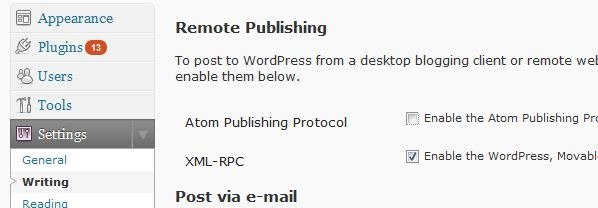
Go to settings >> writing and under Remote Publish allow XML – RPC

live 0

Now open windows live writer and set it up for your blog.

Go to the blogs in the Menu bar and click Add Blog Account

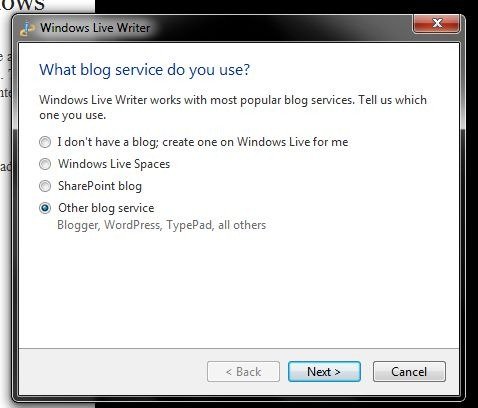
Select the other blog service option.

live 1

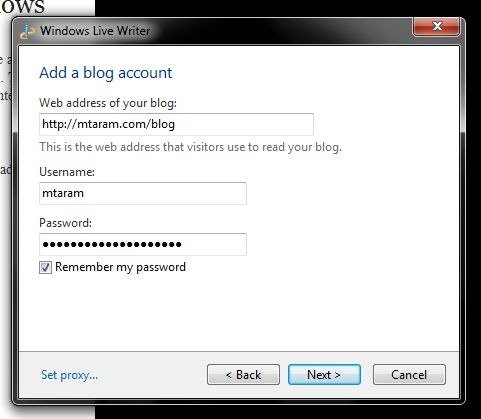
Enter your Blog url, username and password. And if you don’t want to enter the password again and again, check remember password.

live 2

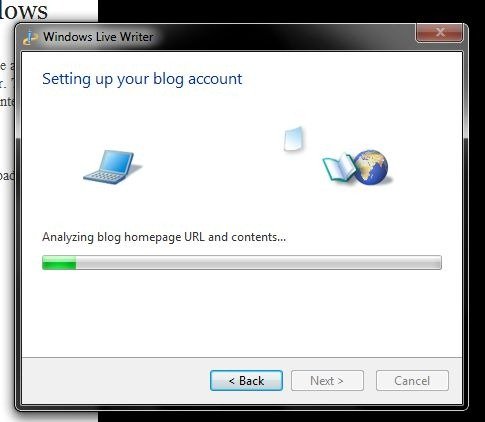
Live writer will Analyze the blog detect the theme and you are done.

live 3

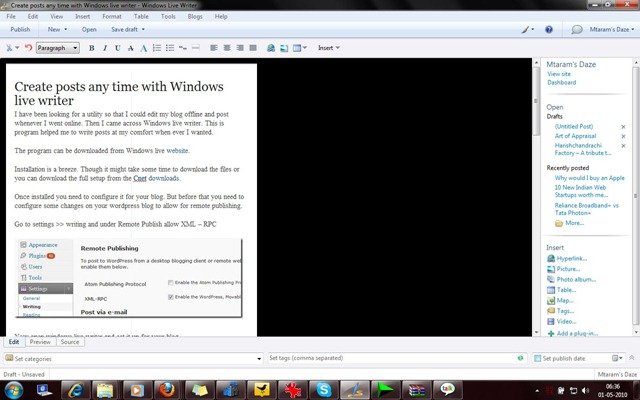
After this the application asks you to enter your Blogs name and Finish. And you are ready to make your posts.

live4

Facebook – the new face of evolving social media

According to Facebook, Public will be the New Private. Goodbye Privacy, Social will now be the default status of the Internet as dominated by Facebook.

At the F8 conference, Facebook released stats of their growth. More importantly, they released tidbits of information which revolutionize the way the 400 million users of Facebook use the Internet.

facebook

Facebook has included.

  1. A Universal Like Button
  2. Auto-Login Capabilities using Facebook
  3. A Facebook Social Bar

And the Open Graph!

So what all this mean and how is it going to change our experience of the Wild Wild Web?

Social plugins like the Universal Like button mean that you can instantly share on Facebook anything you like across the Web. Unlike the share, you can also see all your other friends who’ve liked it, and everyone else who shares the same interest. Lets see what Google and Twitter come up with against this.

A lot of sites will auto-login with your Facebook account. So, you don’t really need to login to Like something. Facebook Connect with it’s multiple permissions will evolve into a one-click permission button, where you can now logon to almost any website.

http://www.geoexpat.com/wp-content/uploads/2009/05/facebook-login.png

The Social Bar adds Facebook Chat. A small bar, hovering on your browser, with the Like Button and Facebook Chat. That’s not all, assuming you’ve auto-connected, it’ll also show you pictures of all your friends who’re currently on that site.

The Like Button has a few more features, like the Activity Stream and the Recommendations Stream. If you go to a Website, you will get recommendations based on your “Like” activity and that of your friends.

The Open Graph!

Facebook will now connect with over 30 partners across the Web to give you a more personal experience. Yelp in the USA maps businesses, restaurants etc. Pandora is prolific in the USA for music. Facebook plans to track usage of these sites deeply with your activity and that of your friends to give you recommendations. Go to CNN.com, and once it’s implemented, you’ll receive recommendations on the stories you might like. Pandora, once linked with Facebook will give you music recommendations. Check out a restaurant on Yelp and you can also see every review that your friends have made on nearby restaurants.

Docs for Facebook! Microsoft and Facebook are now collaborating to unleash on the Internet Docs.com, which is sure to prove to be competition for Google Docs.

Facebook can now evolve to more than just conversations. Docs can be uploaded either through a Web application or through a computer, and more, they can be edited realtime.

Facebook has also finally given details on Facebook Credits, perhaps the most long-awaited virtual currency on the Internet. This is especially important for those who like gaming on FB.

fb-credits fb-credits fb-credits fb-credits fb-credits fb-credits fb-credits fb-credits

Facebook in India!

Facebook has tied up with Naukri.com, Times Internet and Espn Cricket. So now, users can share job postings on Facebook. Naukri, one of India’s largest job-search portals, has integrated Facebook’s new Social Plugins. This integration will give users the ability to share job postings with their circle of friends and view jobs posted by their friends on Facebook using the Naukri platform.

This move by Naukri is a brilliant First Strike as it is the only jobsite partner in India to partner with Facebook.

Times Internet has also jumped onto the bandwagon. Content on Timesofindia.com, Indiatimes.com and all sister websites will be connected via Facebook, to give you recommendations, the ability to instantly share on Facebook and many other features.

Cricinfo.com has also integrated Fb plugins. Cricinfo.com is prolific, and apart from sports news, also features blogs and opinions. And now, Liking the fact that your favourite IPL team is winning will be a click away!

Phew! This is a lot for one go. I am pretty sure that Facebook have massive plans and they are not far from the top. In case I have missed out on something please let us know via your comments.

Power of Retweets

What is a “retweet”or “retweeting”?

Have you ever received an interesting email and forwarded it to your friends?  You know, like a funny joke or a breaking news item that you thought would be of interest to your friends so you hit the “forward” button on your email client to pass that message on. That’s kind of what “retweeting” is except in this case it applies to Twitter messages rather than an email.

RT 

rt2 < | ^ Examples

Why bother to RT [Retweet]?

Passing on of interesting message across circles.

The originator @username more exposure.

You establish yourself as community/social person.

By RTing, you demonstrate that you know how to retweet and that you are a more advanced Twitter user to your followers. This will help you retain your followers who may think of you more highly than someone that merely posts meandering Tweets about mundane things. (Like when you brush your teeth for example!)

If you retweet good content, you spread goodwill to your followers. this increases the retention of your followers.

Every time you retweet, the originator is notified of your message. Meaning, the person being retweeted will get the message in their “@ replies” inbox. This will increase the chances of the originator following you (if they are not already following you) or they may very well return the favor and retweet some of your more interesting tweets!

The majority of Twitter users are accustomed to “retweeting” important news items to a point where news is spread very quickly from the original source to the entire Twitter community. For example the Tsunami news and the Mumbai bomb blast or the Mumbai Train blast news. It was all over Twitter before it actually made it to the news channels.

Apart from this if you can tell of any other advantages of RTs please leave a comment.

Facebook vs Orkut

facebook vs orkut

I was no fan of online social networking till the early days of my college because I had so many real friends and barely spent any time online and then one fine day I was introduced to WordPress which changed brought a turnaround in my cyber life. Most of my real friends were not on online and I had a tough time gathering a following for my blog. I started off with Orkut and after a year or so I was on Facebook. I was on Orkut most of the time till I realized that Orkut was becoming monotonous with nothing much to do. They had been doing great for a long long time [yes… 3-5 years is a long long time in cyber world] but somehow lost it to Facebook.

When I completely moved onto Facebook, I found it better to share and post. I still have a lot many friends on Orkut who are not there on Facebook so I visit Orkut once or twice a week.

I liked Facebook so because it provides so much more exposure than other Social Networks. The proof is the constantly growing number of users on Facebook.

One major fact that makes Facebook better for me is that I feel that I have to spend less time to see what all updates are there unlike in Orkut. [Its the way I feel and I may be biased]. Facebook also allows me to decide what goes where on my page though in a limited way but it still counts. Orkut and Facebook both have chat and I like that. Just one more feature that I want is a common place to upload my pictures so that they are seen on both Facebook and Orkut because I get tires of uploading same pictures two times on both the sites. If any one of you knows any such site or service please let us know.

For those who think that Facebook still lags behind Orkut in India please visit GlobalThoutz illustrations.

We would also like to hear from you all how you feel about the two of them and which one you find better for yourself.

Figures of growth of Digital Market in INDIA

digital_media_consulting

Internet & Mobile Acces in India

  • India currently has around 50-60 million internet users and 7.4 million broadband connections. – DNA
  • With nearly 440 million subscribers, mobile phones cover nearly 40% of the country’s population. – IAMAI
  • India has an active internet user base of about 3.3 million, according to the IAMAI. The report is based on primary survey covering 20,000 Households, 90,000 individuals, 1000 SMEs and 500 cyber cafes countrywide. – Economic Times
  • The number of people in Asia Pacific who have access to the internet grew by 22 percent during the period September 2008 to September 2009. China led the region with a 31 percent growth followed by Japan (18 percent) and India (17 percent)[4]. – Visa Asia
  • The government has planned to expand broadband coverage to connect every gram panchayat to broadband network by May 2012. – CIOL
  • While the world’s tele-density as on December 31, 2008 stands at 78.11 per cent, India’s tele-density, as on October 31, 2009 is 44.87 per cent. the rural tele-density in the country is 18.97 per cent. – CIOL
  • By 2010 we expect there to be over 600 million mobile broadband subscribers, rising to 900 million by 2012 and the vast majority, will be served by advanced networks such as HSPA (High Speed Packet Access) and LTE (Long Time Evolution). – Hindu
  • India has the lowest average of 11 hours per user, ComScore also said, below the regional average of 16.9 hours – MB
  • The report by DtecNet that is based on tracking illegal downloading IP addresses on P2P (Peer to Peer) networks, showed that from April to September 2009, India was among the top 10 countries in the world with the largest number of illegal P2P activities. –Economic Times

Gaming in India

  • Console-based gaming in the country is expected to become a Rs 575 crore market by 2010 as youths increasingly get hooked onto gaming,
    a study said here on Tuesday.
    – Economic Times
  • Mobile gaming is also catching on with the mobile gaming industry pegged at Rs 289 crore, which is a mere five per cent of the overall mobile value-added services industry.This is expected to grow to Rs 812.5 crore by June 2010, it added. – Econonic Times

Online Publishing in India

  • WSJ will launch its 1st mobile reader in India in 2010 –MoneyControl
  • The number of online news and information consumers in India surged 37 percent in the past year, more than double the rate of growth of the total online audience in India,” said Will Hodgman, comScore executive vice president for the Asia-Pacific region. In October 2009, nearly 16 million people visited an online news site in India, a gain of 37 percent from the previous year. A look at the most visited news destinations in India revealed that local brands make up a significant portion of the top news sites – and some of the fastest growing.– comScore

3G In India

  • The successful bidders will get third-generation (3G) spectrum simultaneously only in August 2010. – India Infoline
  • Operators will not be in a position to launch the services before early 2011 – The Hindu Business Line

Online Shopping / E-commerce in India

  • The size of e-commerce market in India is worth around Rs 9,500 crore, out of which the pure play online shopping market is worth Rs 1,300 crore. While online shopping globally is growing at around 8-10%, in India the growth rate is upwards of 30%. –Economic Times
  • The online travel industry in India is expected to grow to $6 billion (over Rs 28,000 crore) in 2010 in terms of revenues (the value of transactions as opposed to the earnings of travel firms). – Business Standard
  • Ebay India Census 2009 – Ebay India

Social Networking in India

  • It’s also one of the most cost- effective channels that offers a reach of around 23.5 million active SNS population (figure according to Sept: comScore report),” – The Indian

Online advertising in India

  • Online advertising is expected to account for Rs1,800 crore in revenues by 2015 – DNA
  • online video advertising industry is currently generating revenues of Rs 40-60 crore, and is expected to touch Rs 200 crore by 2012 –DNA
  • Education and Print medias ad spent on Online Display Advertisements are expected to grow at the rate of 76%, followed by automobile sector which is expected to show the second highest growth rate (46%) with increase in the product launches and emergence of Internet as the effective medium to target youth.– IAMAI
  • The online display advertising industry in India grew to INR 3250 Million in FY 2008-09 with the growth rate of 38%. The study is an exhaustive market research on Indian Online Display Advertisement Market. Based on the primary research conducted in this study, it is expected that the industry will grow at a lower rate at 32% and will grow to INR 4300 Million FY 2009-10.- IAMAI

14 Amazing Twitter Applications

Tweeting is an ART. And it needs dedication and commitment. I came across some wonderful Twitter Applications which I used myself and loved them. I am sharing the same to my readers.

1) Tweepular

untitled

If you want to know who is following you and who is not, this solution will give you the chance to do that in a very simple way.  In addition to this, you will have the opportunity to manage and administer your Tweeps. If you want to track others’ popularity on Twitter as well as to have the chance to get access to a highly effective way to manage all your Twitter followers, take a look at this site.

2)Twittersphere

untitled

It deals with the most hyped stories from social messaging utility. A screen into the greenhouse of world-shaking linkage and chatter.

3) Mr.Tweet

untitled

If you want to know how much influence you have on others. Who are your top twitter buddies. Find new friends with same interest who are active. Amazing site with great insights.


4) Tweeps

untitled

This deals with out Usage of ”words”. What Do we like to use more often. How many tweets we have per day, the social ratio’s, hasttag ratio etc.


5) Twitalyzer

untitled

This is also one good site which deals with Impact percentage, influence, Generosity, Clout and our Engagement.  A good input site. Helpful for us to be better Twitter Users.


6) Twilert

untitled

If you want to keep track of a particular word or hashtag. Just name it here and Schedule it. And you would love to track the results.


7) Twetangle

untitled

This is one hell of an amazing site. There are soo many things that could be managed here,Groups, networks, friends. “TwitTangle is a free service that helps you untangle the mess of having to many friends on twitter. They allow you to rate and tag your friends and then filter your timeline to help you easily find the tweets that are most important to you!  This tool lets you rate and tag your friends and filter them on a timeline! You can also create custom groups of your followers and filter you timeline by that group.


8 ) Untweeps

untitled

Find out who does not tweet often and you can remove them on your choice.

9) Myceaner

untitled

This is yet another tool that will help us automatically unfollow all the inactive accounts based on when their last tweet was, and help you save your follow number.


10) TwtrFrnd

untitled

Helps you to find out if those people whom you are  following are following you back or not

So just register and it will display people whom you follow and the friends of those people and fans of them. It is handy as you can sort of people according to the numbers of followers they have.


11) friendorfollow

untitled

If you’re unsure whether to follow someone or not, just use this tool to find out if you have common interests and whether there are guys you are following in common

12) ReTweet Rank

untitled

It finds out all the re-tweeted stories and grades on the number of re-tweets. It is a good site to know your rank!.

13) Tweet Rank

untitled

Find out which Tweet made you popular and which one un-popular. Find out what people like in you and what they dislike. Make sure  once you check the site you are on English Version.

14) Who follows whom

untitled

Finding out common users between two accounts. Try 2 powerful users and then you can figureout whts the inside story. Try more than 2 accounts and you know whts in real going inside Twitter mentioned People.  Do give it a short. It’s a good application.

T. T. T. Track Twitter Trends

Twitter is HUGE and yes it really is. With more than 600 tweets per second it becomes very difficult to find the information of your taste. To overcome this limitation the Twitter community came up with a novel idea of #hashtags. If you are unaware of #hashtags we have it explained over here.

These #hashtags also gave birth to the trends on Twitter. The number of times the hashtag is repeated in tweets represents its trend. #Hashtags.org shows the latest trends on twitter and also allows you to search for a word and see its trend graph on Twitter.

To know what a #hashtag is about or two define your own for the public you can visit WTHashtag.com. This site is built upon wiki technology, making it easy for visitors to create their own definition entries for certain hashtags.

Here’s one I created: #Mtaram – we use this hashtag when we are sharing news about something cool, new or innovative happening on our Blog.

There are various websites and tools that you can use to track trends on Twitter.

Twist: See Trends In Twitter3593627192_25d6c8b028

Track trends on particular topics or people. The display is in graph form and can be useful in mining data for particular projects. If someone is talking about a topic you have great knowledge of the subject then it might just provide you an in to make an introduction.

Twidentify Twitter Search

This is a search engine that allows you to conduct searches on Twitter influence, related conversations, and Twitter trends. You can search for more than one term at once by separating them with commas. You’re then presented with a graph for the week showing you how each search term compares to the other. You can also hide search terms from your graph if you change your mind.

Tweetag

Here you can “browse the Twittosphere”. The most popular discussed topics within the past 24 hours are displayed underneath the search bar. Results are displayed in a Twitter-like fashion. You can see your search term in status updates only, retweets only, links only or questions. If you want to see them all at once, you can do that on the “all” tab. For each tweet displayed, you can reply to it or retweet it. The timeline is also updated in real-time so no need to refresh the page.

Twitterfall


This is another Twitter trend timeline updated in real-time. If the timeline moves too fast for you or you don’t like the color, you can change the settings to suite your preferences.

And Last but not the least is What the Trend?

This site doesn’t just show you what is trending on Twitter, it gives you an explanation as to why it’s trending — interesting concept. When you click on a hashtag it shows you the latest tweets, news and photos relating to that tag. You can go down the list or use the search bar to find a specific trend.

Try all these cool tools and let us know of your response. And if you happen to know any cool tool that we have missed please mention it in the comments.

How to make most of the Twitter #tags

Tags on Twitter or more popularly known as hashtags or simply #tags are a way of cataloging tweets on Twitter. Just like the wild wild [www] web Twitter too is a micro www in its own where the rate of flow of information is so immense that one can easily freak out. The intelligent users created hashtags and then Twitter incorporated them in its interface making it more useful for users to find the tweets of their interest at the click of a button [or tap of a finger if you use a notebook computer  ]

Now that we have billions of tweets and millions of hashtags how do we make the most of it. [ as if it’s a matter of life and death. BTW Who cares? ]

http://cdn.mashable.com/wp-content/uploads/2009/05/hashtagorg.jpg

First things First!

What does this hashtag stand for? It can be as difficult for Twitter veterans as it is for a newbie to make out what the hashtag stands for from the tag itself. While people are still busy finding the most efficient way to do it use the following to make your way through.

Tagalus: Tagalus is a simple dictionary for hashtags. It’s very easy to find information on thousands of hashtags as defined by other users.

Twubs: Uses a wiki system to help disseminate information on a hashtag. It aggregates tweets and imports pictures to help illuminate the topics being discussed.

Hashtags.org: While not the best at helping you understand the meaning behind a tag, Hashtags.org is good at showing you its use over time and recent tweets, which oftentimes is enough to figure out the meaning behind the tag.

What the Trend?: This useful little service makes it really easy to learn about trending hashtags. When something starts trending.

Tracking the Twitter world via the hashtags.

If you are a journalist, marketing pro or just an individual and like to track the topics of your interest, you can do so via the hashtags. Monitter and Twitterfall are good choices recommended by Mashable to do so.

If you need to track a less popular Twitter hashtag, try setting up a Twilert to get a daily email of the use of a specific hashtag.

Is it really that simple to understand and use?

Yes it is unless some of the unwritten rules are followed. Twitter hashtags are just like Google’s meta keywords [ if you don’t find youself on the same page with us we recommend reading through this article.]

Use them don’t abuse them. If you make every word of your tweet a hashtag then firstly It doesn’t look neat and secondly it doesn’t make sense. It’s just like copying pasting the whole webpage in the keywords field.

Give your hashtag context. Most people won’t actually know what your hashtag means, so give a quick explanation in one of your tweets or, if you’re making a hashtag, make it very apparent what it’s talking about. Be specific and use specific tags instead of generalized words.

I guess that would be end of the gyan from us. We would like to know from you all how you have used hashtags to make the most out of your tweets. Do leave a comment.

Twitter hashtags 101

Limitation is the mother of innovations and twitter hashtags is a wonderful example of it.  Twitter is one of the fastest growing website with more than 600 tweets per second. And it was becoming too difficult for the tweeple to keep track of the topics of interests with more and more tweeple following each other. And hence the #tag was born.

Hashtags are a community-driven convention for adding additional context and metadata to your tweets. They’re like tags on Flickr, only added inline to your post ~ via Search Engine Journal

Twitter provided no easy way to group tweets or add extra data so the Twitter community came up with their own way: hashtags.  A hashtag is similar to other web tags- it helps add tweets to a category. A hash tag is simply a way for people to search for tweets that have a common topic.

Hashtags have the # symbol before the keyword.

For example # + Google = #Google is a hashtag.

It’s not case sensitive so #google and #Google is one and the same thing.

#tag image
This snapshot from siesmic shows a tweet with #USB #futuregadgets and #gadgets . This signifies that the tweet emphasizes on usb, featuredgadgets and gadgets and has information about some usb gadget that has been featured on the article that can be found on that particular shortlink.

How does it work?

The words that are preceded by # are treated special by Twitter. They become the keywords and kind of help the users track the tweets and trends in a better manner.  #tag has more weight than a normal word without a # when searched for.

Suppose we are searching for tweets related to newly launched Buzz by Google. We just need to look for the #Buzz or #Google and this would list the tweets that contain any of these two #tags in them.

Suppose we want to start our own trend then we need to just decide on a keyword. And before just going ahead with adding a # to it and start tweeting we just need to check whether the #tag already exists. If it doesn’t we can use it and then tweet and tell our friends about out #tag and start a trend of our own.

The larger the number of tweets containing a particular #tag more popular it gets and hence has a higher trend. To check what are the trending topics [#tags] check out #hashtag.

Arkayne’s plugin for bloggers

http://a1.twimg.com/profile_images/398388812/ArkayneFavicon_bigger.jpgArkayne delivers relevant links at the bottom of your content. Whether that content is a blog post, news article or any other form of textual information, Arkayne examines every viewable word on the page and then searches your site, sites within your network, and the web for the most contextually relevant matches.

Arkayne does what other related content plugins don’t:

  • Allow your friends to recommend your relevant blog posts.
  • Show more of your posts in your RSS feeds.
  • Introduce you to other bloggers in the same space.
  • Deliver high CTR rates that increase your audience.

This vdo from their website shows how it works.

We installed this plugin yesterday and registered with their network. The concept of recommending the blogs on the newtork is great. We are still lookin out how it can benefit our websites and would be posting more about Arkayne in near future.