Category Archives: Social NW

Branchout brings career networking to Facebook

Everyone you know is on Facebook, and most people have added their resume information. But you can’t search by companies and even searching within your friends for company names is virtually impossible. So if you want to research which of your friends work at a specific company, or which friends of friends do, you head on over to LinkedIn.

Well, not anymore.

BranchOut launched this evening, a new Facebook application that makes career networking a snap. The application unlocks massive amounts of career data about my friends and friends of friends that was just impossible to get to before.

Search on a company name and see which of your Facebook friends work there (or used to). If those friends have installed the app, you can also see how many of their friends have worked at that company. You can then reach out to them for an introduction if you like.

The application also has job listings, currently free for thirty days to your direct network. Soon, says founder and CEO Rick Marini, they’ll let people put up job postings that reach all users, for $30/month. Given who’ll be using this, that should be a no brainer. We’ll certainly list TechCrunch jobs there.

Test it out and let us know what you think.
Facebook $100 Billion IPO in 2012

http://www.zoomstart.com/wp-content/uploads/2008/06/facebook.jpg

Facebook, the dominant internet social networking company, is making plans to go public early next year at a vertigo-inducing valuation of over $100 billion, CNBC reported Monday. The Palo Alto-based web phenom could file registration papers with the Securities and Exchange Commission as early as October.

In January, Facebook said it expected to cross the critical 500-shareholder mark this year, and if it finishes 2011 over the line, it must file quarterly and annual reports with the SEC within 120 days after the end of the year. At the time, Goldman, which had invested $450 million in Facebook, said the company was worth $50 billion.

Today, Facebook is trading at an implied valuation of $80 billion on private, secondary markets like SharesPost, where employees and early investors sell shares to “accredited investors,” including banks and individuals worth over $1 million.

image: http://zoomstart.com

Facebook employees – youngest, stressed but satisfied

http://facebookemoticons.biz/wp-content/uploads/2009/12/facebook-emoticons.jpg

Employees at Facebook, the famous social networking site, are the youngest and most stressed out workers in US tech companies, but are considered to be the most satisfied.

On the other hand, Google staffers are the best paid within the technical market and have low levels of stress. Of course it’s no wonder their staff are so relaxed, Google provides every employee with gourmet meals, massages, game rooms and other perks that aren’t found in most offices. In January, Google employees were given a $1,000 tax-free bonus and 10% pay rise in order to stop staff from defecting to Facebook.

The low age at Facebook is not a surprise at all considering the CEO is only 27 years old. “We really don’t believe that you have to have a lot of experience to make a big difference”, Zuckerberg explained on the company’s career video website. “Look at me, right? I started this from college.”

Large scale tech companies are paid well into the six figures-no surprise considering all the well-paid engineers there are on staff. Also, the workers are paid 23% above the typical pay for the same type of work at a ‘normal’ tech company.

Facebook face recognition and how to disable it

http://www.image-acquire.com/wp-content/uploads/2010/12/facebook_face_recognition.jpg

Facebook has been rolling out a facial recognition feature that makes it easier to tag friends in snaps, and it has introduced this feature as a default setting.
The feature basically means that whenever you’re offered the chance to tag groups of your friends in an album, Facebook will use its facial recognition technology to group similar faces together and automatically suggest the friend you should tag them with.

The option has been rolling out to international users over the past few months.

The social networking site has been making the facial recognition feature a default setting. Facebook explained the rollout in a post on Tuesday.

If you don’t want Facebook to suggest you , here’s how you disable the feature:

1. Go to your privacy settings.
2. Click “Customize settings.”
3. Scroll down to “Things others share.”
4. Find “Suggest photos of me to friends.”
5. Edit accordingly.

image: http://www.image-acquire.com

Twitter adds default ULR shortening to web app

http://5.mshcdn.com/wp-content/uploads/2011/06/twitter-link-shortening.jpgTwitter has announced that links shared on Twitter.com will be automatically shortened using the service’s t.co URL shortener.

Links of any length will be cut down to a tidy number of characters — 19, to be precise — and an ellipsis when the sender clicks the Tweet button.

Although each link is assigned a unique t.co link ID, the links will appear on Twitter as abbreviated versions of their originals so users always have some idea of where their next click will take them — a smart move on Twitter’s part given the number of URL-shortened spam or scam links that have made the rounds on the microblogging platform over the past year or so.

Twitter buys Tweetdeck

http://cdn.sitetrail.com/wp-content/uploads/2011/02/tweetdeck-logo-300x300.pngIt’s official. Twitter last night finalized a deal to buy TweetDeck, ending weeks of speculation.

The two companies announced the acquisition Wednesday in separate blog posts. Terms of the deal weren’t disclosed.

CNN.com reported Tuesday that Twitter was buying the maker of applications for the microblogging site for $40 million in cash and stock.

“This acquisition is an important step forward for us,” wrote Twitter CEO Dick Costolo in a blog post. “TweetDeck provides brands, publishers, marketers and others with a powerful platform to track all the real-time conversations they care about. In order to support this important constituency, we will continue to invest in the TweetDeck that users know and love.”

Iain Dodsworth, TweetDeck Founder and CEO, insinuated in his blog post that TweetDeck staff won’t be let go because of the acquisition.

“We’ve grown from one team member and a single user, to a team of 15 and a user-base of millions,” he wrote. “Change may well be inevitable, but we remain the same team, staying in London, with the same focus and products, and now with the support and resources to allow us to grow and take on even bigger challenges.”

Today’s news comes after weeks of speculation about potential future owners of TweetDeck.

Lost Origin of Twitter

Before Twitter was public, it was just an AIM hack on Jack Dorsey’s pager.

Twitter founder Jack Dorsey had a background in messenger culture. He had even launched a dispatch software startup called D-Net, back in 1999. He was also captivated by his friends status messages on AOL Instant Messenger. He wanted to combine the two. And in an era when AIM was king, he did just that.

“I loved seeing at a glance my friends status updates. But I also really appreciated at the same time the dispatch aspect, where you’re out in the world doing something away from the keyboard and IM did not allow that,” said Dorsey. “I had a RIM pager, the 850, the first email device. I programed a system where I could fire off an email from that and set my status from anywhere. And it worked! And I was able to also at a regular interval pull my buddy list and get those updates sent to my email address. It was awesome! But the number of people who had those mobile devices was so minimal that the timing was just not right. This was 2001.”

In 2006, when he was working for Evan Williams at Odeo, Dorsey resurrected the idea. He combined the timeline aspects of LiveJournal with the status updates of instant messenger and the concept of dispatch software that delivers them all remotely. Boom. That’s Twitter.

via Wired

How to delete Facebook friend list

Long time back I created a few lists on facebook and over the time one of them became redundant. I was looking all over facebook about how to delete that list and ultimately stubled upon the right link.

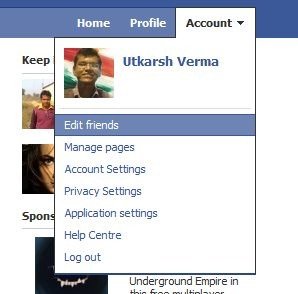
1.click on Accounts
2.click edit friends

fb1
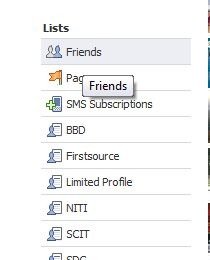
3. On the left, about half way down you will see the category "Lists"

fb2
4.click on the list you want to delete
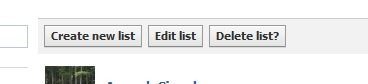
5.click on "Delete List"

fb3
6.Confirm by clicking "Delete List"

Make a mobile site for your blog in 3 steps with Google Reader

Now a days there has been a trend of accessing the web through the phone.

The reasons are:-

Its its easy as all carriers have decent data speeds and in most the browsing is free.

Ease of use as one carries the mobile phone all the time unlike a computer.

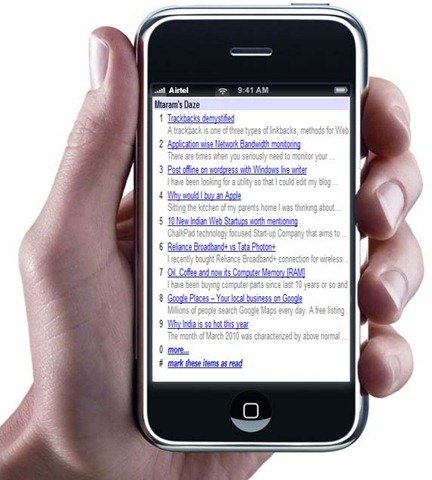
So why not convert your blog to a blog that looks great on mobile phones. To view this blog on mobile mode go to http://m.mtaram.com. For this we would be using the built in functionality of the Google Reader to render the feed for the mobile phones.

mobile blog

What you need:-

1. You blog RSS feed URL

2. Access to your Domain control panel if you are hosting your own blog. Or you can register a free domain name of the numerous sited found on Google and redirect it to your mobile blog using a free URL redirection service.

Step 1.

Login to your Domain Control Panel.

Create a sub-domain like say http://m.mtaram.com

Step 2.

Open your Blogs RSS feeds within Google Reader. The URL looks like http://www.google.com/reader/view/feed/http://feeds.feedburner.com/mmwd [the bold part is the RSS feed of my Blog via Feedburner]. You can use any RSS feed or burn your own Feed using Feedburner.

mobile view

We need to modify this URL for mobile view. To do so add a /m/ to the URL between reader and view. http://www.google.com/reader/m/view/feed/http://feeds.feedburner.com/mmwd.

Step 3.

This can be done in two ways.

First: You can permanently redirect http://m.<yourblog>.com to ">http://www.google.com/reader/view/feed/<your feed url>

Second: You can create an index.php file and specify the redirection in the index.php

Open a notepad file and copy paste the following

<?
Header( "HTTP/1.1 301 Moved Permanently" );
Header( "Location: <your blog url>" );
?>

index.php

where you would be replacing <your blog url> with the modified Google Reader URL.

And you are done. Pass on the ULR of your mobile blog to your fellows and readers and enjoy.

Apart from this there is a plugin for wordpress that detects the device and renders the blog. But some how I did not like it and opted for this faster and easier method.

Trackbacks demystified

A trackback is one of three types of linkbacks, methods for Web authors to request notification when somebody links to one of their documents. This enables authors to keep track of who is linking, and so referring, to their articles.

In layman’s terms, trackback is a way to notify a website when you publish an entry that references it.
When you send it a trackback, a link with a short excerpt of your entry will appear on the referenced website.

How To Locate The Trackback Link

When you want to trackback, you will need to use a special link provided on the blog you want to reference.

Most trackback links appear just after the blog post content and before the comments.

Sometimes the link will appear as a plain text link:

If the trackback URL is hyperlinked, you’ll need to right click on it and select “Copy link location…” (or your browser’s equivalent), otherwise, you can highlight and copy the link.

If you plan to reference more than one blog entry, each trackback URL will need to be copied individually.

(Please note: Not all blogs display their trackback URL in plain view, some blogs even turn off their trackback. When in doubt, contact the blog author.)

Sending A Trackback

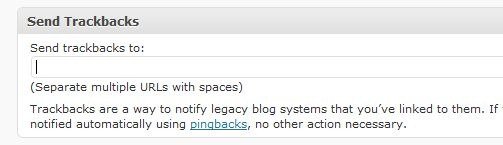
Before you publish your blog entry, you’ll need to tell WordPress to send your trackback notices. This automatically done for the newer versions of wordpress. All referenced wordpress blogs are automatically sent a trackback.

trackback

Paste the trackback URLs into the box and click Publish to send them and publish the post.

Once you’ve added all the URLs you want to trackback, the moment you hit the Publish button, the blog(s) will be notified.