All posts by Ridhima

Witticism | Blogging | Philosophy | Spirituality | Online Junkie | Art Enthusiast | Gratification of senses | Technophile | Bibliophile |Totally Unleased… @Rhydemz on Twitter

Tweepi.com- Poweful twitter tool

tweepi-logo

Tweepi has 4 tools so far, with more to come:

1. Geeky Follow Utility: follow active and sociable users with the same interests as yourself

There are too many people out there using Twitter for an infinite variety of reasons and to share a wide collection of topics ranging from business, to cooking, dancing, technology and so on. The most common way to find and add people with the same interests as you, is to find a popular tweeple within your area of interest, say “@mashable” or “@techcrunch” for technology news, and add people who follow these known users.

This tool helps you filter these people – the geeky way, with numbers in a table – based on their activity and sociability, and follow only quality twitterers.

Tweepi.com Geeky Follow Tool Tweepi.com Geeky Follow Tool 

 
2. Geeky Flush Utility: teach users who do not follow you back a lesson by unfollowing them

Many users on Twitter feel that if a user does not follow them back, it’s somehow insulting. This utility is designed to “teach those users a lesson by unfollowing them” with just a few clicks.

Tweepi.com Bulk Flush Tool Tweepi.com Bulk Flush Tool 

3. Geeky Reciprocate Utility: follow your followers back with a few clicks

It takes a really long time to find all the users you’re not following on Twitter and then following each one back individually! This tool helps you find all the users that follow you, but you do not follow back, and enables you to follow them back with a click of a button.

Tweepi.com Reciprocate Tool Tweepi.com Reciprocate Tool 

4. Geeky Cleanup Utility: filter deadbeat (and useless) tweeples and unfollow them

So, you’re following a few thousand people on Twitter. You must have noticed that many of these users do not engage in conversations, never retweet anybody, or simply just ramble about nonsense stuff all day long (no links to useful content whatsoever!). You can use Tweepi’s geeky cleanup tool to filter these people out and unfollow them.

Geeky Cleanup enables you to clean-up and unfollow annoying tweeples. It lists the users you’re following with information about each, and you can just pick whom to unfollow from the list!

Tweepi's Bulk Cleanup Utility Tweepi.com Bulk Cleanup Utility 

Why do we call it “geeky”?

Tweepi Presets helps you pick better tweeps Tweepi Presets help you pick better tweeps 

That’s simple. I built Tweepi the way I would prefer other services to work – with numbers. I like to know how many tweets a person sent the last week, how many RT’s he made/received, and so on. The list of numbers that I was able to think of and was implemented in Tweepi.com is:

  • Followers
  • Following
  • Updates
  • Tweets last 1 week *
  • Replies sent by user *
  • RTs done *
  • Links tweeted *
  • Replies received *
  • Times retweeted by others *
  • [replies sent] to [replies received] ratio *
  • [followers] to [following] ratio *
  • Links tweeted ratio *

The (*) means that they are limited to the last 7 days.

Of course you can sort the table anyway you want, customize what columns are hidden/shown or use one of the presets to order people by: activity last 7 days, reach/influence (RT and get RT’ed much), twitterers who discuss much (compare replies), higher followers to following ratio or avoid linkless ramblings!

Why Tweepi is a bit geeky? Because it shows numbers! Why Tweepi is a bit geeky? Because it shows numbers – not just blind suggestions! 

How to use Tweepi?

I added some tool tips around the site to help explain how some of the features work. Each of the presets is explained in a tool tip, as well as how to select multiple users. Just hover your mouse above the relevant text. A “Frequently Asked Questions”/FAQ section will be added soon.

 Tweepi is in, as we like to call it “very much a beta” mode. You might find small bugs around the system, and we’d appreciate it if you’d report them to us using the “Feedback” button to the right of all pages of Tweepi.com.

Basic twitter Terms! A must for all

A-S

adventuritter: an adventurous twitterer

beetweet: a buzzing tweet; a “hot” tweet

co-twitterer: a partner that tweets on your Twitter account.

dweet: tweet sent while intoxicated

drive-by-tweet: a quick post inbetween tasks

friendapalooza: a quick burst of friend-adding

mistweet: a tweet in which one later regrets

neweeter: a new tweeter

occasionitter: an occasional tweeter

politweeter: a political tweeter

politweet: a political tweet

qwitter: a tool used to catch twitter quitters- UseQuitter.com

reportwitters: reporter style twitterers

sweeple: sweet twitter people

Twa-

twadd: to add/follow someone to your Twitter account as a friend.

twaffic: Twitter traffic.

twaiting: twittering while waiting.

twalking: walking while twittering via text.

twapplications: Twitter applications.

Twe-

twead: to read a tweet from a fellow twitterer.

tweepish: feeling sheepish or regretful about something you tweeted.

tweeple: Twitter people, Twitter members, Twitter users.

tweeps: Twitter people that follow each other from one social media/network to another.

tweetaholism: the continued use of Twitter as an addiction that is difficult to control.

tweetaholic: someone addicted to Twitter, so much so that it may be an actual problem.

tweet-back: bringing a previous tweet conversation or reference back into the current conversation.

tweet-dropping: eavesdropping on someone else’s home page in friends mode.

tweeter: a user of Twitter.

tweeterboxes: twitterers who tweet too much.

tweetheart: that special tweeter who makes your heart skip a beat.

tweetin: when a group of twitterers agree to get together at a set time to twitter.

tweet(ing): the act of posting to Twitter.

tweets: posts on Twitter by twitterers.

tweetsulted, tweetsult: what do you think it means, you dumb twitterer?

tweetup: when twitterers meet in person – a Twitter meet up.

Twi-

twideo-cronicity: when you’re watching someone’s videos and they are simultaneously leaving a comment or tweet for/at/about you.

twiking: biking while twittering via text.

twinkedIn: inviting friends made on Twitter to connect with you on LinkedIn( ).

twis: to dis a fellow twitterer. very bad form.

twitosphere: community of twitterers.

twittastic: fantastic, wonderful, superb.

twittcrastination: avoiding action while twittering, procrastination enabled by Twitter use.

twittduit: If you need to tweet a friend that does not follow you, post a twittduit asking your followers to pass a message.

twittectomy: an unfollowing of friends.

twitter-light zone: where you are when you return to Twitter after any time away and feel disoriented and lost.

twitter stream: a collection of tweets often times in alphabetical order

twitosphere: the community of twepple.

twitterati: The A-list twitterers.

twittercal mass: a community that has achieved a critical mass of twitterers.

twitterer: a user of Twitter (compare: tweeter).

twittering: to send a Twitter message.

twitterish: erractic behavior with short outbursts.

twitteritas: women who play with their twitters.

twitterness: a person’s contribution to the twitosphere.

twitterfly: being a social butterfly on Twitter evidenced by extreme usage of @ signs.

twitterject: interject your tweet into an existing tweet stream of conversation.

twitter-ku: those who either post on both Twitter and Jaiku( ) or load their Twitter feed into Jaiku.

twitterlinkr: a service collecting the best links posted through Twitter.

twitterlooing: twittering from a bathroom.

twitterloop: to be caught up with friend tweets and up on the conversation.

twittermob: an unruly and ragtag horde of people who descend on an ill-prepared location after a provocative Twitter message.

twittermaps: a mashup technology that lets Twitter users find each other using google maps.

twitterpated: to be overwhelmed with Twitter messages.

twitterphoria: the elation you feel when the person you’ve added as a friend adds you back.

twitterage: rage at a twitter post.

twitterrhea: the act of sending too many Twitter messages.

Twegosearching: Something we never, ever do. Every 5 minutes. All day.

Twitophant / Twitophantic: One who repeatedly tweets the Top 100 in an attempt to gain more followers. Actually pretty smart.

Greentweets International: Well-meaning organizers of the Save the Fail Whales campaign.

15 Killer Hacks for WordPress that Are Extremely Useful

1. Link to External Sources from Your Post Title

Often it is the case where blogger wants to just link to an external resource because he/she finds it useful to their readers. The main problem they face is that they have to make a new post in order to just tell the readers to go to another site. In this Custom Field Hack we will show you how you can link to an external link from your post title.

First thing you need to do is open your functions.php which is found in your template folder where other files like single.php and page.php is located. Paste the following code:

function print_post_title() {
global $post;
$thePostID = $post->ID;
$post_id = get_post($thePostID);
$title = $post_id->post_title;
$perm = get_permalink($post_id);
$post_keys = array(); $post_val = array();
$post_keys = get_post_custom_keys($thePostID);

if (!empty($post_keys)) {
foreach ($post_keys as $pkey) {
if ($pkey==’url1′ || $pkey==’title_url’ || $pkey==’url_title’) {
$post_val = get_post_custom_values($pkey);
}
}
if (empty($post_val)) {
$link = $perm;
} else {
$link = $post_val[0];
}
} else {
$link = $perm;
}
echo ‘<h2><a href=”’.$link.’” rel=”bookmark” title=”’.$title.’”>’.$title.’</a></h2>’;
}

Now you would need to open your index.php and find the following code or something similar:

<h2><a href=”<?php the_permalink() ?>” rel=”bookmark”><?php the_title(); ?></a></h2>

Change it to:

<?php print_post_title(); ?>

Once you have done that, upload both files to your webhost.

Now when you are writing a post, scroll down to where it says Custom Fields. Find the name: url1, title_url, or url_title and add the url to the external resource. Add a short description if you so desire, and hit publish.

Don’t be afraid, this function does not take away your normal post title links, all it does is add an extra query which checks for custom field for external links. If the external link is not included, it refers to the default code and link to the normal post page

There is also a plugin that does this job. It is called Page Links To

2. Change the Default Gravatar for Comments

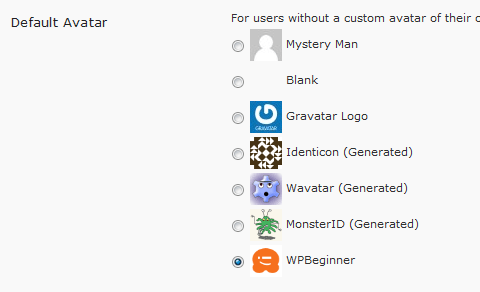
Good Bye Mystery Man

The default mystery man is really annoying for most users. Plus if you have one more chance of branding your blog, then why not do it. Changing your default gravatar lets you brand your blog more. With this snippet below you can change your default gravatar.

First you need to open your functions.php which is located in your template folder. If you don’t have one then create one and insert the following code:

add_filter( ‘avatar_defaults’, ‘newgravatar’ );

function newgravatar ($avatar_defaults) {
$myavatar = get_bloginfo(‘template_directory’) . ‘/images/gravataricon.gif’;
$avatar_defaults[$myavatar] = “WPBeginner”;
return $avatar_defaults;
}

In the code the image is being extracted from the theme directory and it is called gravataricon.gif obviously you will change it to your image name. Where it says WPBeginner, that is the name of the avatar of how it will show in your admin panel options area.

Gravatar Settings

Head over to your admin panel and click Settings > Discussion and change the icon, and now you have a branded comment area with your logo.

3. Display a Retweet Button with your Brand

Add a Retweet button in WordPress

With Twitter getting so much exposure, as a blogger you should already be using it to your advantage. Power of twitter is like no other because it is word of mouth advertising. To make this easier on your readers, what you can do is place a prominent retweet button, so they can retweet the article with one click. Not only just that, but you should make it the way so you can track the retweets as well. That is where tweetmeme widget comes in.

In this tutorial we will have you create a button that will link to the text in the following format:

RT @yoursitename Title of the Post – Link

Add the following code in the template file of your choosing most likely single.php

For the Large Button:

<script type=”text/javascript”>
tweetmeme_source = ‘wpbeginner’;
</script>
<script type=”text/javascript” src=”http://tweetmeme.com/i/scripts/button.js”> </script>

For the Compact Button:

<script type=’text/javascript’>
tweetmeme_style = “compact”;
tweetmeme_source = ‘wpbeginner’;
</script>

Remember to change the source to your twitter account name, this way you will not only promote your account to get more followers, but your article will be promoted as well.

4. Display Random Header Images on Your Blog

Random Header Images

Most blog designs get boring if they have a huge header picture and it is static. This is when this tutorial comes in to make your header images dynamic because it rotates on each visit. You can select as many images as you want to rotate randomly. It brings life to a blog.

First you need to name your images in this format:

  • headerimage_1.gif
  • headerimage_2.gif
  • headerimage_3.gif

You must separate the name with an underscore. You can change the headerimage text to himage or anything you like.

Once you have done that paste the following code in your header.php where you would like the images to be displayed or in any other file.

<img src=”http://path_to_images/headerimage_<?php echo(rand(1,3)); ?>.gif”
width=”image_width” height=”image_height” alt=”image_alt_text” />

Make sure that you change the number 3 if you decide to do more than 3 images. This code is not exclusive for WordPress, it will work with any php based platform.

5. Control When Your Posts are Available Via RSS

Control When Your Posts are Available Via RSS

There are times when you publish a post and suddenly find an error. You can go back in the admin panel and change it, but it is already published in the feeds. With this hack, you can put a delay of as many minutes as you like, so you can double check the post live.

Open your functions.php and add this code:

function publish_later_on_feed($where) {
global $wpdb;

if ( is_feed() ) {
// timestamp in WP-format
$now = gmdate(‘Y-m-d H:i:s’);

// value for wait; + device
$wait = ‘10′; // integer

// http://dev.mysql.com/doc/refman/5.0/en/date-and-time-functions.html#function_timestampdiff
$device = ‘MINUTE’; //MINUTE, HOUR, DAY, WEEK, MONTH, YEAR

// add SQL-sytax to default $where
$where .= ” AND TIMESTAMPDIFF($device, $wpdb->posts.post_date_gmt, ‘$now’) > $wait “;
}
return $where;
}

add_filter(‘posts_where’, ‘publish_later_on_feed’);

This code is adding a 10 minute delay on your post being shown on the RSS Feeds, you can change it by changing the number 10 to as many minutes as you like.

6. Display Certain Categories in a Menu

Display Certain Categories in a Menu

In many cases, users only want to display certain categories in their navigation menu at the top of the page. There are limited spots, that can only be filled by top categories, but if you use the default wp_list_categories code, it will show all categories. This is why this hack below comes in very handy when you want to create a navigation menu and only display certain categories.

<ul style=”float:left; width:730px;”>
<?php wp_list_categories(‘orderby=name&include=7,9,19,16,1,5,17,23’); ?>
</ul>

Note, you can also change the ‘include’ text to ‘exclude’ and show all categories and exclude those that you don’t want displayed. The numbers displayed in the code are the category IDs. Remember since WordPress shows categories in a list format, you will need to edit the CSS in order to make it work.

7. Separate TrackBacks from Comments

Separate TrackBacks from Comments

When you write a great post on your blog, it likely to be linked from all around the blogosphere. At the same time most great posts start a good discussion in the comments. If you don’t separate your trackbacks from comments, it is very hard for your users to follow the comments and the discussion. In this hack we will show you how you can separate trackbacks from comments.

First you need to open comments.php and find a loop that looks something like this:

foreach ($comments as $comment) : ?>
// Comments are displayed here
endforeach;

Replace it with:

<ul>
<?php //Displays comments only
foreach ($comments as $comment) : ?>
<?php $comment_type = get_comment_type(); ?>
<?php if($comment_type == ‘comment’) { ?>
<li>//Comment code goes here</li>
<?php }
endforeach;
</ul>

<ul>
<?php //Displays trackbacks only
foreach ($comments as $comment) : ?>
<?php $comment_type = get_comment_type(); ?>
<?php if($comment_type != ‘comment’) { ?>
<li><?php comment_author_link() ?></li>
<?php }
endforeach;

</ul>

Basically this list is telling WordPress to display the comments in two list. If it is a Trackback display it separately and if it is a normal comment display it separately.

8. How to List Future “Upcoming” Posts

List Future Scheduled Posts

Everyone wants more users to subscribe to their feeds. The way to get more users excited and interested in your blog is to show them the future blog posts that you have scheduled.

First you need to schedule your posts for the future dates. Then open your sidebar.php or wherever you like to display the list of future posts, and paste the following code:

<?php query_posts(‘showposts=10&post_status=future’); ?>
<?php if ( have_posts() ) : while ( have_posts() ) : the_post(); ?>
<h2><?php the_title(); ?></h2>
<span><?php the_time(‘j. F Y’); ?></span></p>
<?php endwhile;
else: ?><p>No future events scheduled.</p>
<?php endif; ?>

The code above is being sorted by the parameter post_status which in this case is “future”, but it can be draft, published and so on. There is also another parameter in this post that limits the number of posts being displayed, showposts=10. You can change the number to however many schedule posts you want to show your users.

9. Display Thumbnails Next to Each Post

Display Thumbnails Next to Each Post

Picture speaks thousand words. We have heard that saying before, and it is true with blogs also. You can’t possibly describe the post enough in a short excerpt, but adding an image brings life to the post and make the user want to click even more. With this custom field hack, we will show you how you can do just that.

First you need to make a default image of a size 210 x 210px which is what we are using at WPBeginner. You can name this default image defaultimage.gif or in this example we are using wpbeginner.gif and make sure you upload it to your theme directory folder.

Then you need to open your index.php and paste the following code where you want the image to be displayed.

<?php $postimageurl = get_post_meta($post->ID, ‘post-img’, true);
if ($postimageurl) {
?>
<a href=”<?php the_permalink(); ?>” rel=”bookmark”><img src=”<?php echo $postimageurl; ?>” alt=”<?php the_title(); ?>” width=”210″ height=”210″ /></a>
<?php } else { ?>
<a href=”<?php the_permalink(); ?>” rel=”bookmark”><img src=”<?php bloginfo(‘template_url’); ?>/images/wpbeginner.gif” alt=”<?php the_title(); ?>” width=”210″ height=”210″ /></a>
<?php } ?>

10. Set an Expiration Date for Your Posts

Set an Expiration Date for Your Posts

This hack comes becomes very useful when you are running a contest because you might be posting information such as clues or hints that you don’t want to stay up for ever. Instead of manually removing the article, you can just make it expire automatically. It also works if you have a product that you are offering a discount on. You posted it on your blog, but you don’t want that discount to stay on your blog after its over. So you can remove it automatically with this code.

All you need to do is replace your WordPress Loop with this code:

<?php
if (have_posts()) :
while (have_posts()) : the_post(); ?>
$expirationtime = get_post_custom_values(‘expiration’);
if (is_array($expirationtime)) {
$expirestring = implode($expirationtime);
}

$secondsbetween = strtotime($expirestring)-time();
if ( $secondsbetween > 0 ) {
// For example…
the_title();
the_excerpt();
}
endwhile;
endif;
?>

Once you have done that, you can use custom fields when writing a post to set an expiration date. Make sure you select the key “expiration” and use the the following date format: mm/dd/yyyy 00:00:00

Now this hack does not remove or unpublish the article instead it just excludes the article from being displayed in the loop.

11. Delete Batches of Post Revisions

Delete Batches of Post Revisions

WordPress has a lot of good features and one of them is Post Revisions. This was included in WordPress 2.6, even though this is a good feature, it can cause some problems. One of them is increase the size of your database. Depending on how long it takes you to write a post, you might have as many as fifty post revisions. Now you can manually delete them, or you can run a simple query which we will show you in this post and get rid of all these useless revisions.

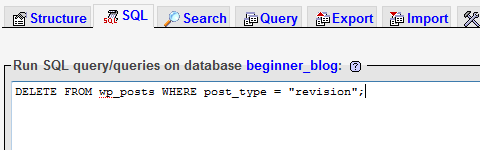
First thing you need to do is login to your phpMyAdmin and select your WordPress Database.

Click on the SQL Button and enter the following query:

DELETE FROM wp_posts WHERE post_type = “revision”;

In this code basically we looked up a table wp_posts and removed every post that had a post_type revision associated with it. Now depending on the size of your database, this may save you a lot of space.

12. Display Any RSS Feed on Your Blog

Display Any RSS Feed on Your Blog

There are often times when bloggers want to display RSS Feeds of other sites on their blog. Maybe it is from another blog of theirs that is related. This is when this hack comes handy because it makes your job much easier. There are several scripts and plugins that will do it for you, but you don’t need those because WordPress has this feature built in. And you should know that because you see the feeds in your Admin Panel Dashboard.

All you have to do is paste the following code where you want the feeds to be displayed. Most commonly placed in sidebar.php:

<?php include_once(ABSPATH.WPINC.’/rss.php’);
wp_rss(‘http://feeds2.feedburner.com/wpbeginner’, 5); ?>

Save the file and Upload it and you are done.

The function we used in this hack wp_rss is built in WordPress for future reference.

13. Display “Digg This” Button on Specific Posts with One Click

Display Digg This Button in Specific Posts

Digg Button in the article is very helpful specially when you article is submitted on digg. But you should not put the digg this button in every post because not every post is meant for digg. For example, if you post an announcement that you will be changing your theme, it does not need to be submitted on digg. This is when this hack comes in where you can just use the custom fields to display the “Digg This” Button in articles that you want.

Add this code in single.php where you want it displayed:

<?php $cf = get_post_meta($post->ID, ‘digg’, true);
if (!emptyempty($cf)) {
echo ‘http://digg.com/tools/diggthis.js” type=”text/javascript”>’} ?>

Now when you create a post use the custom field “Digg” and set any value and it will show the digg field. And if you don’t add that custom field, it will not show. Simple and easy.

14. Display Sticky Posts in One Area

Display Sticky Posts in One Area

This feature was wanted by many users therefore it was included in WordPress. Now in this hack we will show you how you can list all your sticky posts as a featured post in your home page or any other page.

<?php
$sticky = get_option(‘sticky_posts’);
rsort( $sticky );
$sticky = array_slice( $sticky, 0, 5);
query_posts( array( ‘post__in’ => $sticky, ‘caller_get_posts’ => 1 ) );

if (have_posts()) :
while (have_posts()) : the_post();
the_title();
the_excerpt();
endwhile;
endif;

?>

You can change the number 5 the amount of posts you want to show in your page. You can also display full posts by changing ‘the_excerpt’ value to ‘the_content’.

15. Display Ads after the First Post

Adding an ad after the post can get you really good money because advertisers really like that spot. It is one of the hot advertising spots. You can even place adsense there. But if you place as a normal code, an ad will be shown after each post which gets annoying for your users. Therefore using this hack, you can display ads after the first post.

Replace your current loop with this hacked version of the loop in your index.php

<?php if (have_posts()) : ?>
<?php $count = 0; ?>
<?php while (have_posts()) : the_post(); ?>
<?php $count ; ?>
<?php if ($count == 2) : ?>
//Paste your ad code here
<h2><a href=”<?php the_permalink(); ?>”><?php the_title(); ?></a></h2>
<?php the_excerpt(); ?>
<?php else : ?>
<h2><a href=”<?php the_permalink(); ?>”><?php the_title(); ?></a></h2>
<?php the_excerpt(); ?>
<?php endif; ?>
<?php endwhile; ?>
<?php endif; ?>

Now this code will show the ad after your second post. Make sure you insert your ad codes there.

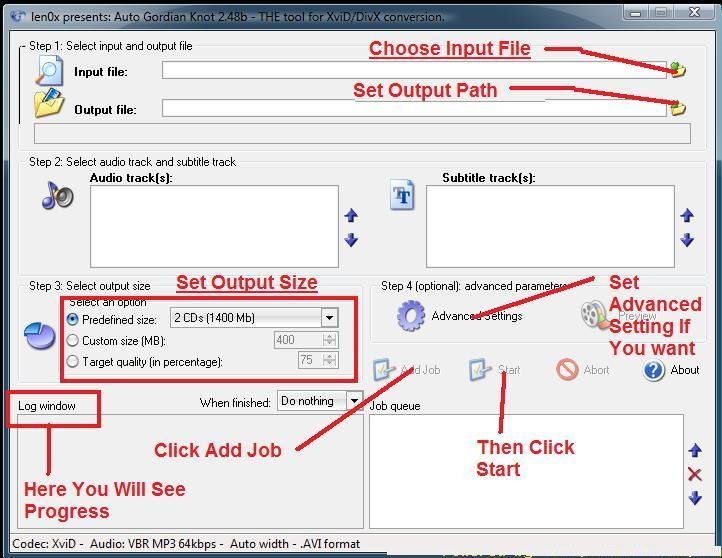
How To Make 700 MB DvD Rip

Untitled

http://www.autogk.me.uk/modules.php?name=TutorialEN

Program features support of:
– DVD/VOBs(unencrypted from hdd), MPEG2, MPEG1, transport streams (including multi-program ones) and AVI/DV input sources
– XviD or DivX(5/6) output formats
– AC3, DTS, PCM, MPA input audio tracks
– AC3, DTS, MPA, CBR/VBR MP3 output audio tracks
– two audio tracks in AVI
– external (vobsub) or internal (burnt-in) subtitles (with support of forced subs)
– HDTV input/output resolutions(upto 1920×1800) and frame rates (50/60fps)
– automatic crop and resize based on compressibility of the source to achieve best results
– automatic detection of input source: PAL, NTSC, FILM, HYBRID
– automatic deinterlacer and IVTC
– automatic split into CD-sized chunks for main video and external subs.

Version : 2.45 Core + 2.48b Update

50 Best Softwares for windows as Freewares!!!

Are you tired of buying utilities or renewing license to your utilities on your already expensive Windows system? Here is a list of 50 such applications that are free to use. Furthermore, these applications do not require any fees and are available absolutely free.

1    Advanced SystemCare Free

Helps to protect, repair, clean and optimize your PC.

Owner : IObit

2    Wise Registry Cleaner Free

Helps you speeds up your PC by cleaning up your registry. Basically it provides windows registry clean up features with pretty easy to use interface.

Owner: WiseCleaner

3    Ccleaner

Helps you optimize your system by cleaning up the system. Cleanup includes Browser history, Trash Files, Temporary files and Log files. Further, it features un-installation of unused application and the registry cleanup.

Owner : Piriform Ltd.

4    Adobe Reader 9.1

Adobe Reader lets you
•    Open up and interact with all PDF documents.
•    View, search, digitally sign, verify, print and collaborate on Adobe PDF files.

Owner : Adobe Systems Incorporated

5    PDF-XChange

PDF – Xchange standard features includes
•    Add Comments and Annotations
•    Add & apply Custom Stamps
•    Mark-up pages with text and objects
•    Type directly on any PDF page
•    Extract text from a PDF page and few more.

Owner : Tracker Software Products (Canada) Ltd

6    AVG Anti-Virus Free Edition

Protection against viruses and spyware
•    Compatible with Windows Xp or higher
•    Light weight and less overhead on OS.

Owner : AVG Technologies

7    avast! Home Edition

Simplest of application in terms of usability.
•    Daily automatic updates
•    Continuous data protection against all types of malware and spyware
•    Available in 30 different languages.

Owner : ALWIL Software

8    Avira AntiVir Personal – FREE Antivirus

Provides Basic protection
for your computer against dangerous viruses, worms, Trojans.
•    Available in 5 different languages

Owner : Avira.com

9    Avant Browser

Its salient feature include online profile storage to let user save users’ bookmarks, RSS Feeds, configurations or web passwords etc, in Avant Online Storage.

Owner : Avant Force

10    Open Office 3.0

Open office is an open source office suite for Windows. This is available for free download and serves as good alternative to well know Microsoft’s Word & Excel. It has full-featured set of office applications for word processing, spreadsheet, and presentation programs.

Owner : CollabNet, Inc., Sun, Sun Microsystems

11    DropBox

This application lets your share files with an account and you could use up to 2 GB (greater space requires paid accounts). This is quite handy tool for sharing your file over internet.

Owner : DropBOX.com

12    SKYPE

This popular freeware is VOIP based application which helps you voice call and is available for free download. You may make computer to computer calls for free. Moreover, Skype is one of the cheap VOIP service available to make computer to Phone calls.

Owner : Skype Limited

13    Smart Defrag

Smart Defrag helps defragment your hard drives more efficiently.
•    Ease of use along with Data Safety and Reliability Guaranteed

Owner : IObit.com

14    Download Accelerator Plus

  • Provides Mirroring Speed Boost to download from the fastest sources.
  • Available in 38 languages
  • Built-in Twitter integration to Tweet directly from DAP

Owner : SpeedBit Ltd

15    Flash Player

Plays multimedia design made with Flash.

Owner : Adobe Systems Incorporated

16    VLC Media Player

•    It supports various audio and video formats which include MPEG-1, MPEG-2, MPEG-4, DivX, mp3, ogg, etc.
•    Further, it is handy for use with DVDs, VCDs, and various streaming protocols.

Owner : Videolan.org

17    YouTube Downloader

•    YouTube Downloader is software that allows you to download videos from YouTube, Google Video, Yahoo Video, and many others
•    This lets you convert them to other video formats for Ipod, Iphone, PSP, Cell Phone, Windows Media, XVid and MP3.

Owner : Biennesoft

18    Irfan View

•    Fast directory view (moving through directory)
•    Batch conversion (with image processing)
•    Multipage TIF editing
•    File search
•    Email option
•    Multimedia player
•    Print option and many more.

Owner : Irfan skiljan

19    Notepad++

•    It is a very good source code editor with support for several programming languages.
•    Very good search and replace option.
•    It has good Bookmarking and Multi-document support feature.

Owner : sourceforge.net

20    Textpad

•    Huge files can be edited, up to the limits of 32-bit virtual memory.
•    Good search and replace files in huge files.
•    Warm Start feature lets you restart exactly where you left off.
•    And many more.

Owner : Helios Software Solutions

21    Word Web

•    Provides Definitions, Synonyms and Usage for 150000 root words.
•    Includes audio pronunciations
•    Light-weight to the system

Owner : WordWeb Software

22    Applian FLV Player 2.0

•    Play FLV Files on any PC
•    Zoom to 2x or full screen.
•    Includes free audio/video recorder & converter option.

Owner : Applian Technologies Inc.

23    Easeus Partition Manager 3.5

•    Resize/Move partitions without data loss
•    Extend system partition easily and safely
•    Create, Merge, Split, Delete and Format partitions
•    Support up to 2TB partition or hard drive

Owner : CHENGDU YIWO Tech Development Co., Ltd.

24    Free YouTube to MP3 Converter

•    Lets you convert the YouTube video and download it as MP3 or Wav format.
•    Automatically fills the title tag and the artwork in the downloaded mp3 files.

Owner : DVDVideoSoft Limited

25    Undelete Plus

•    Restore accidentally deleted files
•    Image recovery from Compact Flash, SmartMedia, MultiMedia and Secure Digital cards.

Owner : Phoenix Technologies Ltd

26    Video mp3 Extractor 1.8

•    Convert Video Files (AVI, ASF, WMV files)  to mp3
•    Fast audio extraction algorithm
•    Easy to use interface.

Owner : GeoVid.

27    Diagram Designer 1.22

•    Creating flowcharts, UML class diagrams, illustrations and slide shows.
•    Import/export WMF, EMF, BMP, JPEG, PNG, MNG, ICO, GIF and PCX images.
•    Consists of slide show viewer and Simple graph plotter to plot mathematical expressions.

Owner : meesoft.logicnet.dk

28    Real Temp

•    Reads temperature information for all inter Core processors.
•    Keep track of the minimum and the maximum temperature of the processor.
•    Provides calibration features for each core of your processor.

Owner : www.techPowerUp.com

29    Pidgin

•    Free chat client with support for Msn, Yahoo, AIM Google Talk and other chat networks all at once.
•    Supports more than 60 different languages.

Owner : pidgin.im

30    VNC Viewer Free Edition 4.1 

•    Easy connect and use remote computer screen.
•    Easy to install and use.
•    Supports loading and saving of .vnc a file which contains a set of connection options.

Owner : RealVNC Limited

31    Free Video to iPod and PSP Converter

•    Helps convert full video or the part of video to Apple iPod, Sony PSP, BlackBerry and mobile phones MP4 video format

Owner : DVDVideoSoft Limited

32    LimeWire

•    Helps user connect to P2P network and share the file they want to share.
•    Faster starup and less waiting time.
•    Better memory usage
•    Free download and usage for basic usage.

Owner : Lime Wire LLC

33    FrostWire

•    Completely free and open source.
•    Provides Faster Torrent Speeds, I-Tunes compatibility, Friendly online chat rooms, easy navigation and many more.

Owner : frostwire.com

34    JetAudio

Even though plus Vx cost but basic version is absolutely free. Features it consists are as
•    Audio CD ripping
•    Voice recording
•    File conversion between various formats and
•    Audio CD buring.

Owner : JetAudio Inc.

35    Sql Tools

•    This tool is for Oracle 8/9i/10g PL/SQL development.
•    Provides good basic editor services
•    Easy to install and connect to ORACLE server

Owner : Aleksey Kochetov

36    Tortoise SVN

Tortoise SVN is Subversion client having features such as
•    Atomic Commits
•    Directory and File versioning,
•    Versioned Metadata
•    Consistent Data Handling
•    Reliable and quick tagging and branching and many more.

Owner : subversion.tigris.org

37    7 Zip

•    High Compression ratio
•    Compression ratio in the new 7z format is 30-50% better than ratio in ZIP format
•    Supports multiple formats such as 7z, ZIP, CAB, RAR, ARJ, LZH, CHM, GZIP, BZIP2, Z, TAR, CPIO, RPM and DEB formats

Owner : Igor Pavlov

38    The Gimp

The GIMP is a more of the complex image editor like Photoshop available for windows platform. This application is free for download. It is quite good alternative Adobe’s Photoshop with similar features available for use.

Owner : The GIMP Team


39    iTunes

ITunes is a freeware that helps you play your digital music and video. It helps you synchronize your iPod, iPhone, and Apple TV.

Owner : Apple Inc.

40    JCreator

Jcreator is a light weight IDE for Java Programmers. Project management, project templates, code-completion, debugger interface, editor with syntax highlighting, wizards and a fully customizable user interface are some of the functionality that it provides.

Owner : Xinox Software

41    Eclipse

Eclipse is Software Development environment with support for multiple programming languages such as Java, C++, perl, PHP and others.

Owner : The Eclipse Foundation

42    MySql

MySql is a free open-source relational database management system (RDBMS).  This is the most popular open source RDBMS and offers free download and usage. Further this has adequate features needed by small to medium scale database.

Owner : Sun Microsystems, Inc

43    Cygwin

Cygwin is a Linux-like environment for Windows.
This provides a DLL which acts as a Linux API emulation layer providing substantial Linux API functionality.

Owner : Cygwin

44    Apache

•    This is free/open source http web server.
•    This provided Server-side programming language support to authentication schemes.

Owner : Apache Software  Foundation

45    Xampp

•    Xampp is a comprehensive set of web development resources under a bundle.
•    This is integrated package that consist PHP, PHP myAdmin, Mysql RDBMS, Apache Web server, Filezilla Ftp Client and few more.

Owner : Apache Friends

46    HTTrack

•    This is freeware that you download the full website into your local folder.
•    Arranges the file in the same directory structure.
•    Further, lets you browse the pages with offline browser utility.

Owner : Xavier Roche & other contributors

47    AVS TV Box Free

•    AVS TV Box Beta is a FREE universal software TV viewer and comes along with Personal Video Recorder functionality (PVR) .
•    PVR allows you to schedule TV recordings.
•    It works with any windows video capture device like satellite, TV and DVB cards, miniDV cameras, video capture cards and others.

Owner : Online Media Technologies Ltd., UK

48    Mozilla ThunderBird

•    This is good alternative to Microsoft’s Outlook. This is an email client email and Usenet client.
•    Provides features such as easy mail setup, attachment re-minder, One click Address Book and many more.

Owner : Mozilla

49    Free Guitar Tuner

Free guitar tuner provides features for tuning acoustic and electric guitars. It provides few set of tones to tune it.

Owner : GCH Guitar Academy

50    mTorrent

mTorrent is free to download and use torrent client. This is one of the finest, speedy, efficient, and free torrent clients. Ease of installation and use along with user friendly GUI makes it quite popular.

Owner : BitTorrent, Inc.

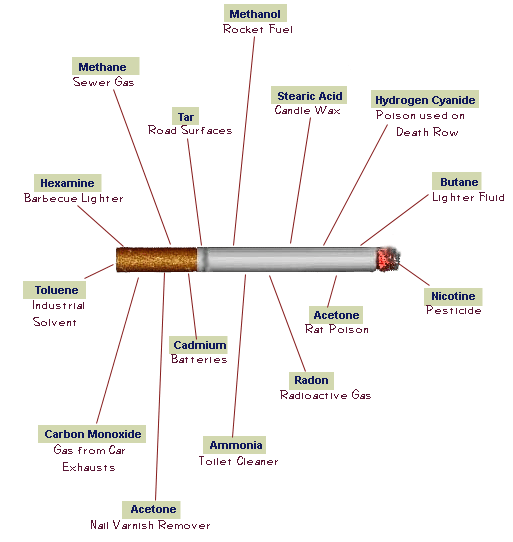
Interesting Facts about Tobacco Smoking Revealed

cigarette

Do you know that Tobacco smoking kills more than 5 million people every year? The number is very surprising because it is more than  HIV/AIDS, Tuberculosis and Malaria combined. And if the current trends continue, Tobacco use could kill more than 8 million people per year by 2030, and up to 1 billion people in total in the 21st century. These findings, and others are contained in the WHO Report on the Global Tobacco Epidemic, 2009.

Only 5.4% of the world’s population was covered by comprehensive smoke-free laws in 2008.  That means more than 94% of people remain unprotected by comprehensive smoke-free laws shows that much more work needs to be done, WHO said.

The report also describes countries’ efforts to implement the tobacco control package called MPOWER, those are WHO Framework Convention and its guidelines includes-

  • monitor tobacco use and the policies to prevent it;
  • protect people from tobacco smoke;
  • offer people help to quit tobacco use;
  • warn about the dangers of tobacco;
  • enforce bans on tobacco advertising, promotion and sponsorship; and
  • raise taxes on tobacco.

Less than 10% of the world’s population is covered by any one of these measure, the report states.

Other key findings of the report include the following.

  • Five more countries –– Djibouti, Egypt, Islamic Republic of Iran, Malaysia and Mauritius –– met the best practices for health warnings on cigarette packages.
  • Three more countries –– Israel, Romania and the United Arab Emirates –– offered comprehensive help to quit.
  • Only one country –– Panama –– joined the small group of countries that bans all forms of tobacco advertising, promotion and sponsorship. More than 90% of people lack protection from tobacco industry marketing.
  • Six more countries –– Czech Republic, Estonia, Fiji, Finland, the Netherlands and Seychelles –– levied tobacco taxes higher than 75% of retail price.
  • Of the world’s 100 most populous cities, 22 are smoke-free.

13

India’s First eReader – Pi launched


While the silicon valley and numerous Apple fan-bois are busy praising the iPad, here in India, Infibeam, the shopping portal has come up with its own eBook reader. The eBbig_textook reader is called “Pi”. Amazon has recently launched its own Kindle, followed by Apple Launching the iPad, which can be used as an eBook reader.


 

One lakh digital books are available to Pi owners from infibeam.com. The company plans to add more books over a period of time. Pi gives users the option to upload their own content from a PC or any other device via USB.

Infibeam.com is also in advance talks with a number of newspaper publications to provide subscription based access to the large amount of newspaper content to its consumers. And it’s not just a eBook reader unlike Amazons’ Kindle, but it is also equipped with music playback option. Features and specifications includes:

  • Screen: 6″ E Ink® Vizplex. No backlight / glare.
  • Slim: Less than 10mm
  • Light Weight: 180gm
  • Formats supported includes PDF, EPUB, HTML, TXT, MOBI, DOC and Images (will show in grayscale – screen is 600×800 pixels) in JPG, BMP & PNG.
  • Internal Memory of 512 MB which can save about 500 books and expandable up to 4GB via SD Slot.

“The idea of Pi has been with us for the past two-years and a lot of R&D effort has gone in the same. We are proud to have created India’s first-ever reading device. Pi should not be seen just as a device but has great socio-economic  ramifications, just imagine a doctor consulting his latest medical journal on the fly, or a lawyer looking at the latest case laws or even students having access to his text book in less than a 180 gm device. We can look at many such applications that have the potential to redefine how Indians view and look at content,” said Vishal Mehta, founder and CEO, infibeam.com.

Priced at 9,999 INR, this looks like a good purchase. You can preorder it from the official Infibeams Pi site for 999 INR. Infibeam would start shipping the device from February 22, 2010.

Adobe: Flash Apps Will Run On The iPad, Even Full Screen At Some Point

adobe_flash

While Apple is being lamented here and there for not supporting Flash on its shiny new iPad – boy does Cupertino have a strong dislike for the platform – Adobe has already responded to the news on the official Flash Platform blog.

The blog post, unambiguously titled “Building iPad Applications with Flash”, is mostly just to remind people of the company’s Packager for iPhone product, which will enable developers to make Flash apps function on the iPhone / iPod Touch through a work-around whereby Flash apps can be easily converted into iPhone apps using Creative Suite 5 (CS5). Adobe also published a post on its Adobe Flash Platform blog addressing the apparent lack of Flash support in the iPad.

Andreessen-Backed Makara Unveils Cloud Application Deployment And Management Platform

Stealth startup Makara is launching publicly tonight with its cloud-based application deployment and management platform. Formerly known as WebappVM, Makara has raised angel funding from Marc Andreessen and Ben Horowitz. The startup also raised $6 million last year from Shasta Ventures and Sierra Ventures.

Rather than offer a system management software designed for traditional application environments to the cloud, Makara’s’s cloud-based platform leverages the virtual layer to allow developers to rapidly deploy, scale and monitor applications in cloud environments. The product, which is self-service and self-managing, is available for free on its site

Top 100 Twitter Applications

twitter


  1. twittervision (4282 overall)
  2. twitterfeed (3867 overall)
  3. twhirl (3319 overall)
  4. tweetscan (2655 overall)
  5. twistori (2631 overall)
  6. twitter-search (2500 overall)
  7. tweetdeck (2439 overall)
  8. twitpic (2244 overall)
  9. hellotxt (1979 overall)
  10. twitterrific (1729 overall)
  11. twitterholic (1612 overall)
  12. tweetstats (1549 overall)
  13. twellow (1527 overall)
  14. twitturly (1460 overall)
  15. twitter-grader (1431 overall)
  16. twitscoop (1410 overall)
  17. quotably (1334 overall)
  18. twitterlocal (1319 overall)
  19. monitter (1285 overall)
  20. twubble (1264 overall)
  21. twittearth (1191 overall)
  22. grouptweet (1180 overall)
  23. hashtags (1124 overall)
  24. tweetburner (1113 overall)
  25. twitbin (1093 overall)
  26. twittercounter (1081 overall)
  27. tweetlater (994 overall)
  28. terraminds-twitter-search (966 overall)
  29. tweetvolume (944 overall)
  30. qwitter (935 overall)
  31. friendorfollow (929 overall)
  32. twitthis (902 overall)
  33. twist (883 overall)
  34. twitter-karma (854 overall)
  35. xpenser (822 overall)
  36. twittermail (813 overall)
  37. twemes (803 overall)
  38. tweetbeep (803 overall)
  39. twitdir (770 overall)
  40. twitxr (767 overall)
  41. twitterfox (760 overall)
  42. hahlo (688 overall)
  43. twinfluence (654 overall)
  44. tweetmeme (652 overall)
  45. tweetwheel (647 overall)
  46. twuffer (636 overall)
  47. botanicalls-twitter-diy (631 overall)
  48. twittersnooze (629 overall)
  49. twtpoll (614 overall)
  50. mrtweet (609 overall)
  51. twittercal (605 overall)
  52. remember-the-milk-for-twitter (594 overall)
  53. snitter (593 overall)
  54. twitterpatterns (585 overall)
  55. strawpollnow (575 overall)
  56. twitterfone (547 overall)
  57. whoshouldifollow (539 overall)
  58. twitbacks (539 overall)
  59. tweetr (526 overall)
  60. twitdom (525 overall)
  61. tweetree (522 overall)
  62. favrd (520 overall)
  63. election.twitter (506 overall)
  64. peoplebrowsr (501 overall)
  65. tweetclouds (498 overall)
  66. pockettweets (498 overall)
  67. cursebird (488 overall)
  68. twistory (480 overall)
  69. twitterverse (470 overall)
  70. tweetgrid (470 overall)
  71. twittermap (466 overall)
  72. tweetag (458 overall)
  73. twilert (457 overall)
  74. twitterposter (456 overall)
  75. loudtwitter (443 overall)
  76. twitterfriends (439 overall)
  77. spaz (431 overall)
  78. be-a-magpie (421 overall)
  79. tweetake (420 overall)
  80. twitter-friends-network-browser (419 overall)
  81. matt (414 overall)
  82. twitter100 (411 overall)
  83. colorwar2008 (411 overall)
  84. twitteroo (408 overall)
  85. tweetrush (389 overall)
  86. fuelfrog (385 overall)
  87. twitter-blocks (383 overall)
  88. tweeterboard (375 overall)
  89. spy (373 overall)
  90. twerpscan (372 overall)
  91. splitweet (371 overall)
  92. twittergram (364 overall)
  93. twittgroups (362 overall)
  94. brightkit (361 overall)
  95. twitlinks (359 overall)
  96. twitternotes (358 overall)
  97. tweetwasters (354 overall)
  98. foodfeed (352 overall)
  99. twitterblacklist (348 overall)
  100. twitku (347 overall)