All posts by Utkarsh

Solution designer with Firstsource solutions. A post grad in Networks and IT Infrastructure. Technology enthusiast, blogger, webdesigner, Network security aspirant and in love with electronics and gadgets. This blog is an attempt to share what I find interesting... almost anything @Mtaram on twitter and

And the journey goes on…

600fd200e03f523902e498c6ae2de530[1] I am almost done with my short two months vacation at home which I spent happily with old friends from nursery and some gambling 🙂 [read office assignment]. This short vacation was after the 2 years long vacation at SCIT. SCIT was one of the best phase of my life which made me realize my strengths and weaknesses. I met a lot of people and had a lot of fun and made some awesome friends for life. Thanks to Harkat Ul Funky.

I could never had made it without the support from you all, I am grateful to all whom I met anywhere and everywhere. Starting tomorrow I start a new spell of life with FirstSource Solutions which I am sure would get me more awesome friends and more experience with one helluva life.

Moving ahead one step at a time taking life along as it comes…..

Thanks a lot to all of you. Love ya all 🙂
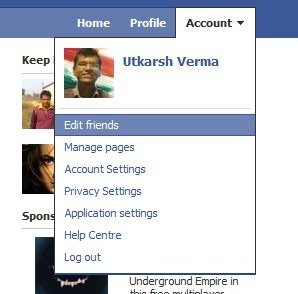
How to delete Facebook friend list

Long time back I created a few lists on facebook and over the time one of them became redundant. I was looking all over facebook about how to delete that list and ultimately stubled upon the right link.

1.click on Accounts
2.click edit friends

fb1
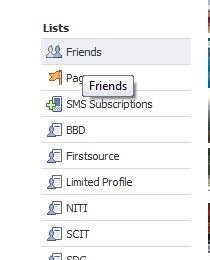
3. On the left, about half way down you will see the category "Lists"

fb2
4.click on the list you want to delete
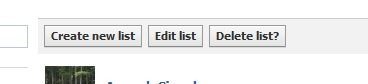
5.click on "Delete List"

fb3
6.Confirm by clicking "Delete List"

Facebook at work

facebook-at-work[1]

Whenever I check Facebook in the noon all is see is that most of my requests have been accepted in a time frame of last 3 to 4 hours. Most of the comments are made on my updates in the same time frame and most status updates too are made at the same time. It seems like people come to work, start their workstations, fire up their browsers and … tada… www.facebook.com …. and the work begins…

There is also a lot of activity at the end of the day in evening but not as much as in the morning. The reason I think is “The day starts at the same time for all but ends at different hours for each of us”, isn’t it?

Facebook at Work = Lost Productivity?

According to the Nucleus Research survey, employers are losing 1.5 workers per 100 in employee productivity to the supposed time-wasting activity known as "Facebooking." To reach that number, the company surveyed a random sampling of 237 office workers.

A Second Opinion

Nucleus Research isn’t seeing the bigger picture here, so we’d like to counter their research with some findings from the University of Melbourne. U of M professor Dr. Brent Coker also surveyed a small sample of office workers (300 to be exact) and came to a rather different conclusion.

Read the full discussion on Readwriteweb and also let us know about your thoughts 🙂

Dharavi: A feature

image

It doesn’t take a wizard’s eye to see the advantage that Dharavi has. It is served by two railway lines suitable for middle class commuters, along with Bandra Kurla complex, a global corporate enclave located directly across the remaining mangrove swamps, as close to Dharavi as Wall Street is to Brooklyn Heights. Dharavi enjoys the advantage of being close to both the Domestic as well as the International Airport.

There is not a single kind of work that is not being done in Dharavi from the daily wages unskilled labourer to the highly skilled craftsmen whose works are exported to Americas and the Europe.

Dharavi, right in the middle of the map. Is a quirk of geography and history. Large masses of poor people are not supposed to be in the center of the city. They are supposed to be on the periphery, stacked up on the outskirts. Dharavi had once been on the northern fringe, but ever growing Mumbai had sprawled toward the famous slum, eventually surrounding it.

Dharavi is routinely called “the largest slum in Asia,” a dubious attribution sometimes conflated into “the largest slum in the world.” This is not true. Mexico City’s Neza-Chalco-Itza barrio has four times as many people. In Asia, Karachi’s Orangi Township has surpassed Dharavi. Even in Mumbai, where about half of the city’s swelling 12 million population lives in what is euphemistically referred to as “informal” housing, other slum pockets rival Dharavi in size and squalor.

coming soon more on Dharavi’s contribution to economy.

Excel at Farmville with Farmville Magic Tools

I liked playing Farmville on Facebook quite a lot until my farm grew so large that it took hours to manage it. As I love automation I started to search for some tools to automate the ploughing, planting and harvesting of crops.

fvmt16[1]

My search landed me with Farmville Magic Tools. Its a good program that can automatically do most of the mundane stuff on the farm. Download the application from here. One thing that I liked the most is that it auto updates itself for new plants.

The application is easy to use and self explanatory.

1) Start Farmville
2) While the game is running, drag the cow over the game
window
***OR***
2) Press the Mooo button to activate the Mooo Box
and place it over your farm.

*TO PLOW*
1) Zoom out the view as far as possible and press the Magic
Plow Tool button.
*TO PLANT*
1) Select a seed in the game
2) Zoom out the view as far as possible and press the Magic
Plant Tool button.
*TO HARVEST*
1) Zoom out the view as far as possible and press the Magic
Harvest Tool button. You can do all operations in fullscreen mode using hotkeys.
You can enable the Automatic Sell/Delete confirm. Be careful.
You can enable the Automatic Harvest/Collect for trees and
animals, just click on the item and the program will click
harvest/collect for you.

Intel core series of processors demystified

intel The new 2010 Intel® Core™ i7 processor, Intel® Core™ i5 processor, and Intel® Core™ i3 processor deliver intelligent performance for desktop and laptop PCs. Each core works on two tasks simultaneously, enabled by Intel® Hyper-Threading Technology (Intel® HT Technology).

Ideal for graphic and compute-intensive applications, these processors offer IT a sound investment for the business requirements of today and tomorrow. With Intel® Turbo Boost Technology built in, you can increase business productivity and performance while maximizing speed to match workloads. Based on 32nm Intel® microarchitecture, these processors offer the foundation for reliable, responsive, and energy-efficient PCs.

intel core

Difference between Core i3, Core i5 and Core i7

Intel will stop selling Core 2 Duo and Core 2 Quad in 2010. Core is the new range of Intel processors.

Core i3:
* Entry level processor.
* 2-4 Cores
* 4 Threads
* Hyper-Threading (efficient use of processor resources)
* 3-4 MB Catche
* 32 nm Silicon (less heat and energy)

Core i5:
* Mid range processor.
* 2-4 Cores
* 4 Threads
* Turbo Mode (turn off core if not used)
* Hyper-Threading (efficient use of processor resources)
* 3-8 MB Catche
* 32-45 nm Silicon (less heat and energy)

Core i7:
* High end processor.
* 4 Cores
* 8 Threads
* Turbo Mode (turn off core if not used)
* Hyper-Threading (efficient use of processor resources)
* 4-8 MB Catche
* 32-45 nm Silicon (less heat and energy)

Make a mobile site for your blog in 3 steps with Google Reader

Now a days there has been a trend of accessing the web through the phone.

The reasons are:-

Its its easy as all carriers have decent data speeds and in most the browsing is free.

Ease of use as one carries the mobile phone all the time unlike a computer.

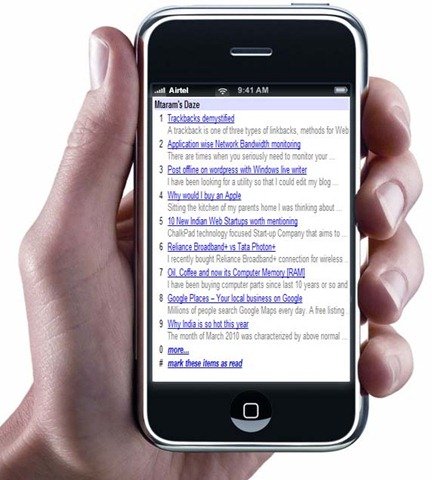
So why not convert your blog to a blog that looks great on mobile phones. To view this blog on mobile mode go to http://m.mtaram.com. For this we would be using the built in functionality of the Google Reader to render the feed for the mobile phones.

mobile blog

What you need:-

1. You blog RSS feed URL

2. Access to your Domain control panel if you are hosting your own blog. Or you can register a free domain name of the numerous sited found on Google and redirect it to your mobile blog using a free URL redirection service.

Step 1.

Login to your Domain Control Panel.

Create a sub-domain like say http://m.mtaram.com

Step 2.

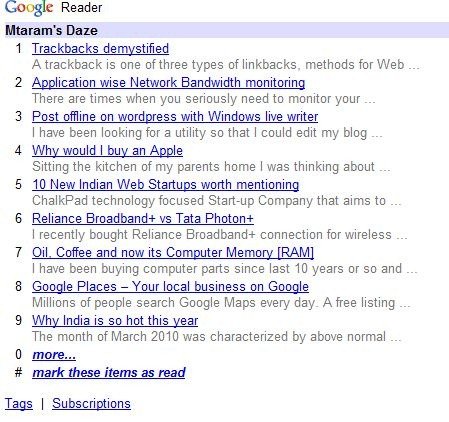
Open your Blogs RSS feeds within Google Reader. The URL looks like http://www.google.com/reader/view/feed/http://feeds.feedburner.com/mmwd [the bold part is the RSS feed of my Blog via Feedburner]. You can use any RSS feed or burn your own Feed using Feedburner.

mobile view

We need to modify this URL for mobile view. To do so add a /m/ to the URL between reader and view. http://www.google.com/reader/m/view/feed/http://feeds.feedburner.com/mmwd.

Step 3.

This can be done in two ways.

First: You can permanently redirect http://m.<yourblog>.com to ">http://www.google.com/reader/view/feed/<your feed url>

Second: You can create an index.php file and specify the redirection in the index.php

Open a notepad file and copy paste the following

<?
Header( "HTTP/1.1 301 Moved Permanently" );
Header( "Location: <your blog url>" );
?>

index.php

where you would be replacing <your blog url> with the modified Google Reader URL.

And you are done. Pass on the ULR of your mobile blog to your fellows and readers and enjoy.

Apart from this there is a plugin for wordpress that detects the device and renders the blog. But some how I did not like it and opted for this faster and easier method.

Trackbacks demystified

A trackback is one of three types of linkbacks, methods for Web authors to request notification when somebody links to one of their documents. This enables authors to keep track of who is linking, and so referring, to their articles.

In layman’s terms, trackback is a way to notify a website when you publish an entry that references it.
When you send it a trackback, a link with a short excerpt of your entry will appear on the referenced website.

How To Locate The Trackback Link

When you want to trackback, you will need to use a special link provided on the blog you want to reference.

Most trackback links appear just after the blog post content and before the comments.

Sometimes the link will appear as a plain text link:

If the trackback URL is hyperlinked, you’ll need to right click on it and select “Copy link location…” (or your browser’s equivalent), otherwise, you can highlight and copy the link.

If you plan to reference more than one blog entry, each trackback URL will need to be copied individually.

(Please note: Not all blogs display their trackback URL in plain view, some blogs even turn off their trackback. When in doubt, contact the blog author.)

Sending A Trackback

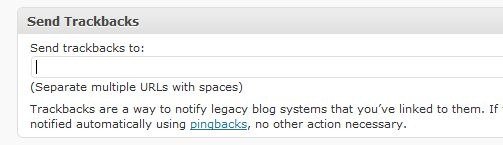
Before you publish your blog entry, you’ll need to tell WordPress to send your trackback notices. This automatically done for the newer versions of wordpress. All referenced wordpress blogs are automatically sent a trackback.

trackback

Paste the trackback URLs into the box and click Publish to send them and publish the post.

Once you’ve added all the URLs you want to trackback, the moment you hit the Publish button, the blog(s) will be notified.

Application wise Network Bandwidth monitoring

There are times when you seriously need to monitor your computer activities. The most important thing to monitor among these is the network connections and the bandwidth they are using if you are not on an unlimited connection and billed heftily for extra usage.

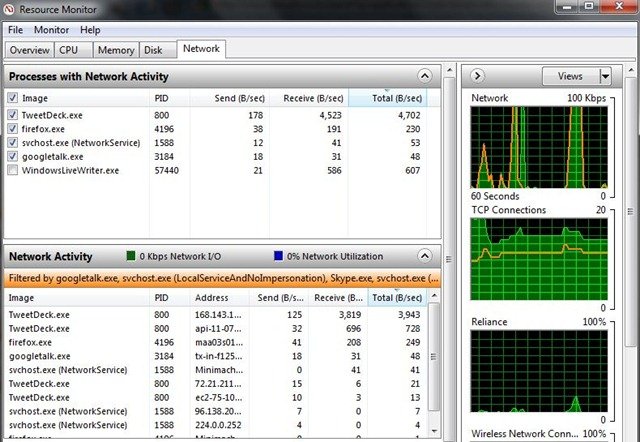
I searched for some and found out the Windows 7s resource monitor does this by default. No need to look beyond.

bw mon 

As you can see in the picture that the network tab shows us the details of all the applications that are using the network resources. Its helpful in so many ways. It helps me monitor which application is using un necessary bandwidth and can be closed. At times you would not like to go your bandwidth to waste for unwanted application specially when you are using a pay per MB plan for the internet access.

Apart from Applications the Resource Monitor can show what all connection an application has made and how much its uploading / downloading.

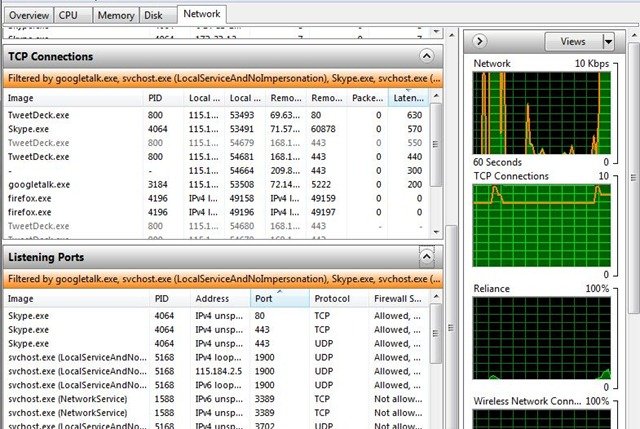
Apart from this the application also shows the number of TCP connections made by all the applications using the resources of the network.

bw mon3

It also shows the listening port details just in case you are curious to know about them 🙂

Post offline on wordpress with Windows live writer

live

I have been looking for a utility so that I could edit my blog offline and post whenever I went online. Then I came across Windows live writer. This is program helped me to write posts at my comfort when ever I wanted.

The program can be downloaded from Windows live website.

Installation is a breeze. Though it might take some time to download the files or you can download the full setup from the Cnet downloads.

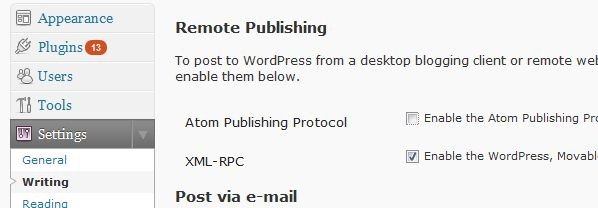
Once installed you need to configure it for your blog. But before that you need to configure some changes on your wordpress blog to allow for remote publishing.

Go to settings >> writing and under Remote Publish allow XML – RPC

live 0

Now open windows live writer and set it up for your blog.

Go to the blogs in the Menu bar and click Add Blog Account

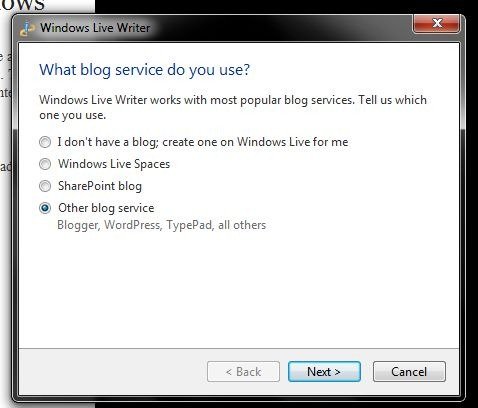
Select the other blog service option.

live 1

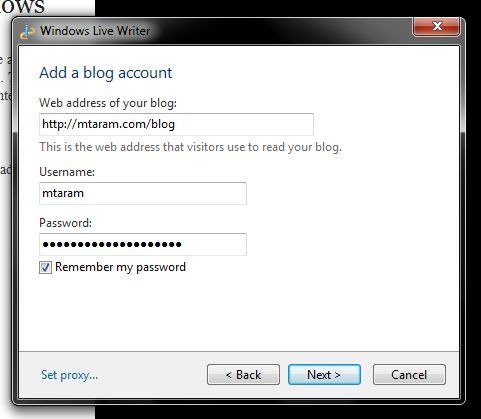
Enter your Blog url, username and password. And if you don’t want to enter the password again and again, check remember password.

live 2

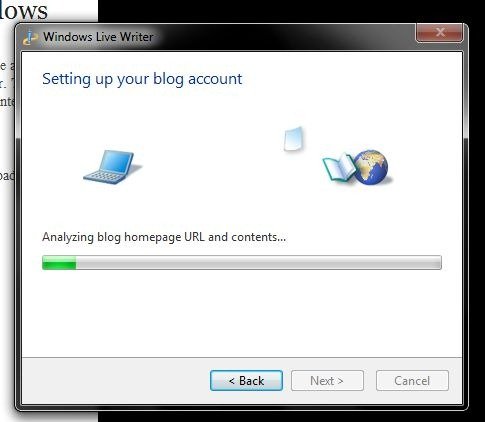
Live writer will Analyze the blog detect the theme and you are done.

live 3

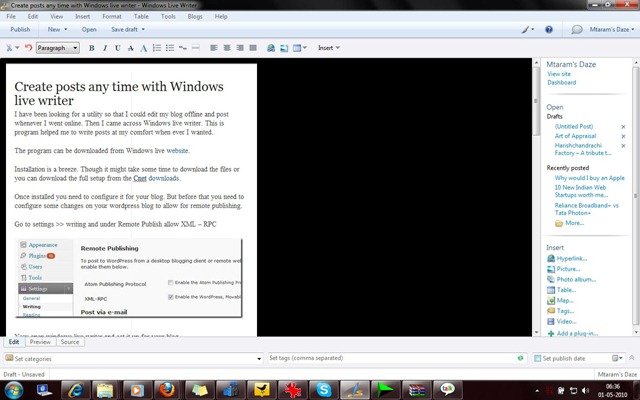
After this the application asks you to enter your Blogs name and Finish. And you are ready to make your posts.

live4