
• Log In
  • Register
Mtaram's Daze
  • Home
  • About me
    • Friends
    • iLike
  • Abstract
    • Color
    • Intellect
    • Pain
    • Poems
    • Success
  • Computers
    • Applications
    • Computer Troubleshooting
    • hardware
    • Security
      • Information Security
    • windows
  • General
    • Environment
    • Events
    • Finance
    • FUN n TP
    • How Tos
    • News
    • Reviews
    • Sidebar Photoblog
    • Sports
    • Work
  • Hacking
    • My Hacks
  • Internet
    • Google
    • Search
  • Mobile
    • Android
    • Apps
  • Social NW
    • Blog
    • Facebook
    • Twitter
    • Wordpress
  • Technology
    • Arduino
    • Gadgets
    • Gaming
  • 3 in 1 Search!
  • About US
  • RSS
  • May 18, 2013
  • SMS Updates

Add Prev Next post link to wordpress blog

‹‹‹ Previous Post Next Post ›››
February 11, 2010
By Utkarsh

Some of the themes of wordpress dont come with previous/next post links when viewed in single post mode. This can be quite frustrating for the readers [it sure was for me]. My theme is “Magazine Basic” and it doesnt have previous/next post links.
To add these links to my theme I tried Bobs simple navigation plugin. But the issue with this plugin is that, It just displays the post title as a link confusing the users what that link is about. There is a hover feature that tell the link details but it take more than 2-3 seconds to be visible.

I tried a lot and ultimately found the solution here. I did a little customizations. Following are the steps how to go about it along with my customizations.

First you need to have access to the directory which holds your wordpress files.

Navigate to <blog dir>/wp-content/themes/<your theme>/single.php

and edit it. Add the follwing code where you want it to be visible. I added it twice to make it appear at top and bottom of the post.
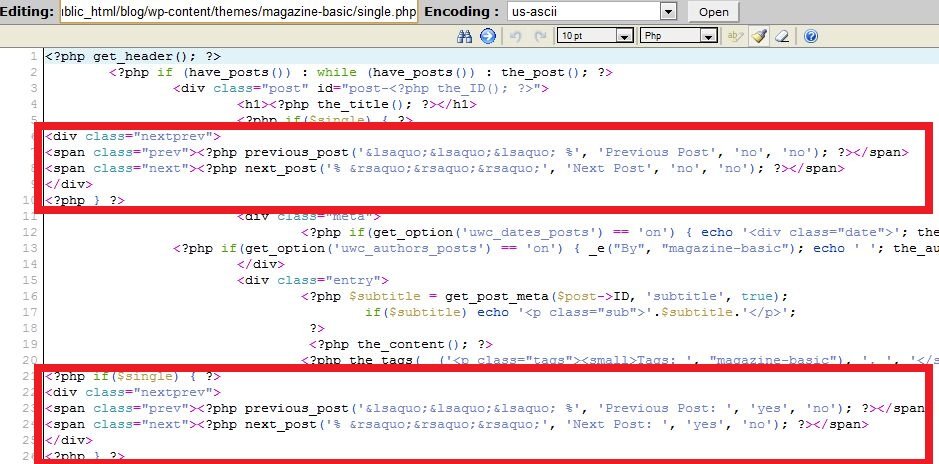
wp link

<?php if($single) { ?>
<div>
<span><?php previous_post('&lsaquo;&lsaquo;&lsaquo; %', 'Previous Post', 'no', 'no'); ?></span>
<span><?php next_post('% &rsaquo;&rsaquo;&rsaquo;', 'Next Post', 'no', 'no'); ?></span>
</div>
<?php } ?>

This would just show the text you want to display for the links.

top

<?php if($single) { ?>
 <div>
 <span><?php previous_post('&lsaquo;&lsaquo;&lsaquo;  %', 'Previous Post', 'yes', 'no'); ?></span>
 <span><?php next_post('% &rsaquo;&rsaquo;&rsaquo;',  'Next Post', 'yes', 'no'); ?></span>
 </div>
 <?php } ?>

This would show the name of the post too along with the text.

bottom

As you can see both links are differently styled… It depends upon the style defined for that region in the css.

One last step.

The above code wont show any results unless you define the details in the css file located at Navigate to

<blog dir>/wp-content/themes/<your theme>/styles.css

Edit this file and add

.nextprev {
 height: 1.5em;
}
.nextprev .prev {
 float: left;
}
.nextprev .next {
 float: right;
}

Tags: links, previous next, single post, wordpress

‹‹‹ Previous Post: India Mortgage Next Post: Valentine Bid ›››

You might also like

Trackbacks demystified A trackback is one of three types of linkbacks, methods for Web authors to request notification when...
A new Blog : Saralsys’s Blog One of my friends has started off with his own blog. . While my blog is mostly about the technology and...
Feel like blogging? Blog with us! If you always wanted to have a blog but didn't wanted to go through the hassles of maintaining one?...
Tata nano – my lucky charm :) Tata nano has proved to be luck for me. My first post about Nano was last year on January 26 when I was...
Grab This Widget

Line Break

Author: Utkarsh (473 Articles)

Solution designer with Firstsource solutions. A post grad in Networks and IT Infrastructure. Technology enthusiast, blogger, webdesigner, Network security aspirant and in love with electronics and gadgets. This blog is an attempt to share what I find interesting... almost anything @Mtaram on twitter and Google+

5 Responses to “ Add Prev Next post link to wordpress blog ”

  1. uberVU - social comments on February 12, 2010 at 1:31 am

    Social comments and analytics for this post…

    This post was mentioned on Twitter by mtaram: Add Prev Next post link to #wordpress #blog http://bit.ly/bB8LNy | #Howto #Tip #hack…

  2. Rhydemz on February 12, 2010 at 1:33 am

    Good work! Many of my friends were searching for this;) lol

  3. mtaram on February 16, 2010 at 1:52 pm

    Add Prev Next post link to #wordpress #blog – http://mtaram.com/blog/2010/02/11/add-pr...

  4. enked on February 16, 2010 at 1:56 pm

    RT @mtaram: Add Prev Next post link to #wordpress #blog – http://mtaram.com/blog/2010/02/11/add-pr...

  5. Clair on December 19, 2011 at 4:43 am

    Many thanks for trying to explain the terminlogy towards the newcomers!

Leave a Reply

Click here to cancel reply.

Opt out of 'Thank You' e-mails..


Blogroll

  • Aima's blog
  • Anant Srivastav
  • Chatter That Matters
  • Computer Tricks and Tips
  • Harsh Ajmera's Blog
  • Life is Beautiful!!
  • Open Source Innovation
  • POET'S NOOK
  • Tech by a Teen
  • The Cyber Nag
  • The IT Axis
  • Vandy's Blog
  • VinolXi


Copyright © 2013 Mtaram's Daze. All Rights Reserved.
337 ‘queries’