All posts by Utkarsh

Solution designer with Firstsource solutions. A post grad in Networks and IT Infrastructure. Technology enthusiast, blogger, webdesigner, Network security aspirant and in love with electronics and gadgets. This blog is an attempt to share what I find interesting... almost anything @Mtaram on twitter and

LLP in India – benefits and how to.

LLP: A corporate business vehicle that enables professional expertise and entrepreneurial initiative to combine and operate in flexible, innovative and efficient manner, providing benefits of limited liability while allowing its members the flexibility for organizing their internal structure as a partnership.

LLP, a legal form available world-wide is now introduced in India and is governed by the Limited Liability Partnership Act 2008, with effect from April 1, 2009. LLP combines the advantages of ease of running a Partnership and separate legal entity status and limited liability aspect of a Company.

  • LLP is a separate legal entity separate from its partners, can own assets in its name, sue and be sued.
  • Unlike corporate shareholders, the partners have the right to manage the business directly
  • One partner is not responsible or liable for another partner’s misconduct or negligence.
  • Minimum of 2 partners and no maximum.
  • Should be ‘for profit’ business.
  • Perpetual succession.
  • The rights and duties of partners in LLP, will be governed by the agreement between partners and the partners have the flexibility to devise the agreement as per their choice. The duties and obligations of Designated Partners shall be as provided in the law.
  • Liability of the partners is limited to the extent of his contribution in the LLP. No exposure of personal assets of the partner, except in cases of fraud.
  • LLP shall maintain annual accounts. However, audit of the accounts is required only if the contribution exceeds Rs. 25 lakhs or annual turnover exceeds Rs.40 lakhs.

how to register
A LLP is indeed advantageous because of comparatively lower cost of formation, lesser compliance requirements, easy to manage and run and also easy to wind-up and dissolve, no requirement of minimum capital contributions, partners are not liable for the acts of the other partners and importantly no minimum alternate tax (as of date). But, LLP cannot raise money from the public.

Details of Fee

1. For registration of Limited Liability Partnership including conversion of a firm or a private

company or an unlisted public company into Limited Liability Partnership:

(a) Limited Liability Partnership whose contribution does not exceed Rs. 1 lakh Rs. 500/-

(b) Limited Liability Partnership whose contribution exceeds Rs. 1 lakh but does not exceed Rs. 5 lakhs Rs. 2000/-

(c) Limited Liability Partnership whose contribution exceeds Rs. 5 lakhs but does not exceed Rs. 10 lakhs Rs. 4000/-

(d) Limited Liability Partnership whose contribution exceeds Rs. 10 lakh Rs. 5000/-

2. The difference between the fees payable on the increased slab of contribution and the fees paid on the preceding slab of contribution shall be paid through Form 3.

3. For filing, registering or recording any document, form, statement, notice, Statement of Accounts and Solvency, annual return and an application along with the Statement for conversion

of a firm or a private company or an unlisted public company into LLP by this Act or by these

rules required or authorized to be filed, registered or recorded:

(a) Limited Liability Partnership whose contribution does not exceed Rs. 1 lakh Rs. 50/-

(b) Limited Liability Partnership whose contribution exceeds Rs. 1 lakh but does not exceed Rs. 5 lakhs Rs. 100/-

(c) Limited Liability Partnership whose contribution exceeds Rs. 5 lakhs but does not exceed Rs. 10 lakhs Rs. 150/-

(d) Limited Liability Partnership whose contribution exceeds Rs. 10 lakh Rs. 200/-

4. Fee for any application other than application for conversion of a firm or a private company or an unlisted public company into LLP shall be as under:-

(a) An application for reservation of name u/s 16 Rs. 200/-

(b) An application for direction to change the name u/s 18 Rs. 10000/-

(c) Application for reservation of name under Rule 18(3) Rs. 10,000/-

(d) Application for renewal of name under rule 18(3) Rs. 5000/-

(e) Application for obtaining DPIN under rule 10(5) Rs.100/-

5. Fee for inspection of documents or for obtaining certified copy thereof shall be as under:-

(a) For inspection of documents of an LLP under section 36 Rs. 50/-

(b) For Copy or extract of any document under section 36 to be certified by Registrar Rs. 5/- per page or fractional part thereof.

6. Fee for filing any form or a Statement of Account and Solvency or a notice or a document by foreign limited liability partnership.

(a) For filing a document under rule 34(1) Rs.5000/-

(b) Any other form or Statement of Account and Solvency or notice or document Rs.1000/-

Certifying Authorities (CA) has been granted a license to issue a digital signature certificate under Section 24 of the Indian IT-Act 2000. One can procure Class 2 or 3 certificates from any of thefollowing certifying authorities.

Tata Consultancy Services (TCS)
National Informatics Center (NIC)
IDRBT Certifying Authority
SafeScrypt CA Services, Sify Communications Ltd.
(n) Code Solutions CA
MTNL Trust Line
Customs & Central Excise
E-MUDHRA

For further details please visit the Govenment of India website for LLP
8 = Cat

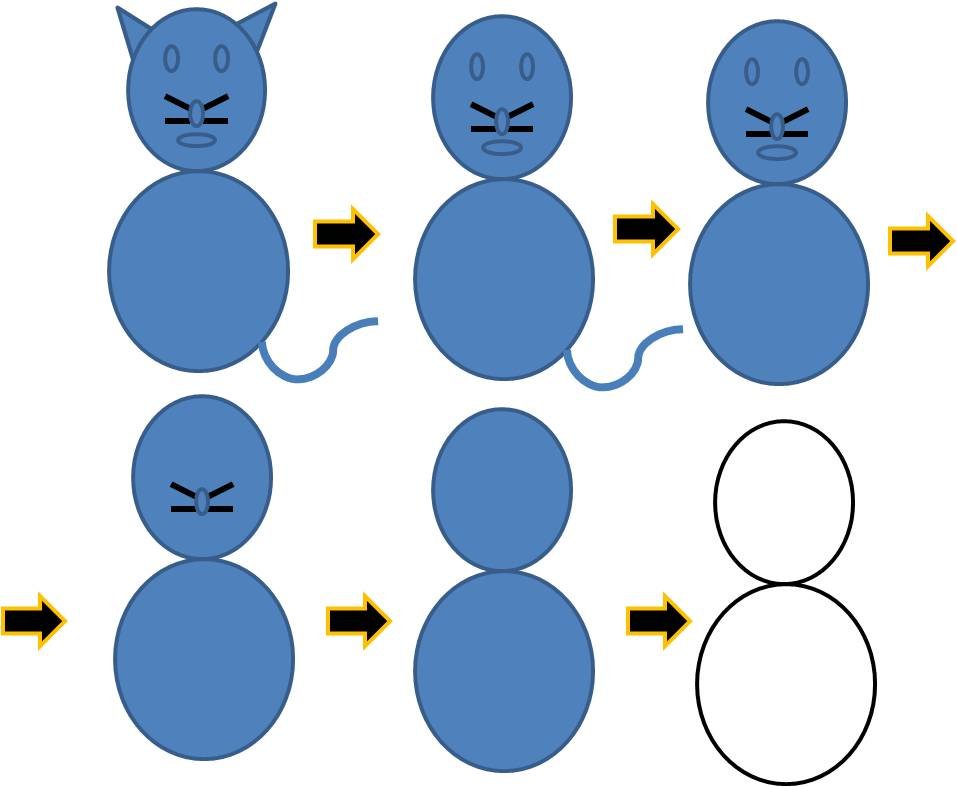
As a kid I loved to draw. Till I was not of the school going age, my mom used to teach me how to write A, B, C etc. But I liked drawing the most. The figure I drew most was a cat. Here is an incident from my childhood when I had just started to goto school and we were learning to write the numbers.

cat=8

As I have told that I loved to draw cats and thus I was very happy when we reached the number 8 and we got to fill 4 pages with the same figure. I just loved it. It was for the first time I had finished my home work in shcool. When I came back from school, I showed it to my mom and told her that I made so many cats… 🙂

Organic Cotton – Now I know what it is!

What is “organic cotton?”
http://www.djc.com/blogs/BuildingGreen/wp-content/uploads/2009/03/cotton-plant.jpgOrganic cotton is grown using methods and materials that have a low impact on the environment. Organic production systems replenish and maintain soil fertility, reduce the use of toxic and persistent pesticides and fertilizers, and build biologically diverse agriculture. Third-party certification organizations verify that organic producers use only methods and materials allowed in organic production. Organic cotton is grown without the use of toxic and persistent pesticides and synthetic fertilizers. In addition, federal regulations prohibit the use of genetically engineered seed for organic farming.

Ecological Footprint
Cotton covers 2.5% of the world’s cultivated land yet uses 16% of the world’s insecticides, more than any other single major crop. Other environmental consequences of the elevated use of chemicals in the non organic cotton growing methods consist of:

* High levels of agrochemicals are used in the production of non-organic, conventional cotton. Cotton production uses more chemicals per unit area than any other crop and accounts in total for 16% of the world’s pesticides.
* Chemicals used in the processing of cotton pollute the air and surface waters.
* Residual chemicals may irritate consumers’ skin.
* Decreased biodiversity and shifting equilibrium of ecosystems due to the use of pesticides.

19022010(011)

Advantages
Cotton growers who make the transition to biologically based growing practices expect to not only offer a healthier and cleaner product, but to also benefit the planet. Some of the contributions to the different ecosystems include:

* Protecting surface and groundwater quality (eliminating contaminants in surface runoff)
* Reduced risk insect and disease control by replacing insecticide with the manipulation of ecosystems
* Long-term prevention of pests through beneficial habitat planting.
* Conservation of biodiversity
* Eliminate the use of toxic chemicals used in cotton
* Organically grown crops also yield soils with higher organic matter content, thicker topsoil depth, higher polysaccharide content, and lower modulus of rupture; therefore reducing considerably soil erosion.

Arkayne’s plugin for bloggers

http://a1.twimg.com/profile_images/398388812/ArkayneFavicon_bigger.jpgArkayne delivers relevant links at the bottom of your content. Whether that content is a blog post, news article or any other form of textual information, Arkayne examines every viewable word on the page and then searches your site, sites within your network, and the web for the most contextually relevant matches.

Arkayne does what other related content plugins don’t:

  • Allow your friends to recommend your relevant blog posts.
  • Show more of your posts in your RSS feeds.
  • Introduce you to other bloggers in the same space.
  • Deliver high CTR rates that increase your audience.

This vdo from their website shows how it works.

We installed this plugin yesterday and registered with their network. The concept of recommending the blogs on the newtork is great. We are still lookin out how it can benefit our websites and would be posting more about Arkayne in near future.

WordPress plugins that make our blog cool

WordPress is a state-of-the-art publishing platform with a focus on aesthetics, web standards, and usability.

http://www.alleba.com/blog/wp-content/uploads/2008/09/wordpress-plugin-2.jpg

Plugins can extend WordPress to do almost anything you can imagine.We have tried numerous plugins. Some were too good, some crappy, some very useful and some totally annoying. After installing, editing, deleting and reinstalling we are left with the following cool plugins which provide our readers with the wonderful reading exprience.

About the Author Box

Visit plugin site

Displays a sleek “about the author” box in the single posts page. This is very useful for team blog having too many writers.

about the autjor

All in One Adsense and YPN

Visit plugin site

Inserts Adsense or YPN code in to your blog posts. Ad position can be random or pre-defined.

adsense

All in One SEO Pack

Visit plugin site

Out-of-the-box SEO for your WordPress blog.

Arkayne Plugin

Visit plugin site

First, if you have not already done so, create an Arkayne account. Second, paste the token you were given by Arkayne into the Arkayne Setup admin page. As people visit more of your pages Arkayne will build links.


you are social

Best Related Posts

Visit plugin site

Shows related posts with thumbnails. Allows you to design your own layout using simple interface.

best related posts

FaceBook Share (New)

Visit plugin site

Adds a button which allows you to share post and also shows the number of times the post or page has been shared through out the Facebook just like tweetmeme button does for twitter.

fbshare

FeedBurner FeedSmith

Visit plugin site

Originally authored by Steve Smith, this plugin detects all ways to access your original WordPress feeds and redirects them to your FeedBurner feed so you can track every possible subscriber.

FollowMe

Visit plugin site

WP FollowMe is a wordpress plugin that allow you to add a twitter Follow me badge on your wordpress blog.

followme

Google XML Sitemaps

Visit plugin site

This plugin will generate a special XML sitemap which will help search engines like Google, Yahoo, Bing and Ask.com to better index your blog.

GZIP Output

Visit plugin site

Allow GZIPped output for your WordPress blog. Restores functionality removed in WordPress 2.5.

My Page Order

Visit plugin site

My Page Order allows you to set the order of pages through a drag and drop interface. The default method of setting the order page by page is extremely clumsy, especially with a large number of pages.

New User Email Setup

Visit plugin site

A Plugin to setup the registration email sent to new users. REQUIRES PHP 5

Online Leaf

Visit plugin site

Changing the standards of websites’ energy consumption is a big task, so we need all the help we can to spread the message.

Popularity Contest

Visit plugin site

This will enable ranking of your posts by popularity; using the behavior of your visitors to determine each post’s popularity. You set a value (or use the default value) for every post view, comment, etc. and the popularity of your posts is calculated based on those values. Once you have activated the plugin, you can configure the Popularity Values and View Reports. You can also use the included Widgets and Template Tags to display post popularity and lists of popular posts on your blog.

popularity contest


Post Layout

Visit plugin site

Adds HTML or javascript code before, after or in the middle of the content of pages or posts without modify the theme.

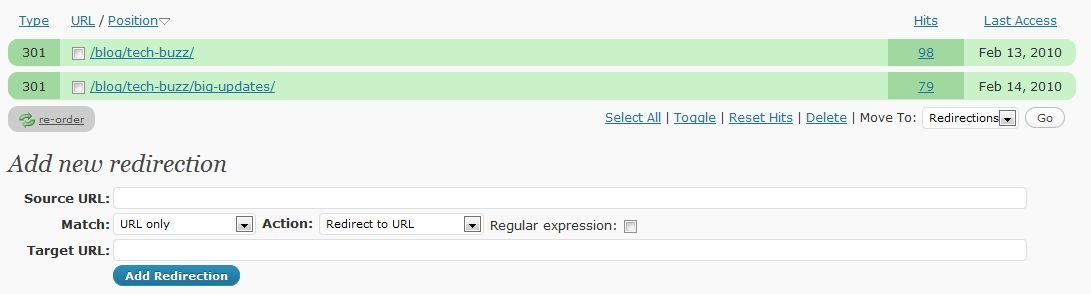
Redirection

Visit plugin site

Manage all your 301 redirects and monitor 404 errors

redirection

SexyBookmarks

Visit plugin site

SexyBookmarks adds a (X)HTML compliant list of social bookmarking icons to each of your posts. See configuration panel for more settings.

sexybm

Smart Video

Visit plugin site

Plugin to insert videos from Youku, Tudou, QQ Video and some other online video sites (mainly supporting chinese sites).

TweetMeme Retweet Button

Visit plugin site

Adds a button which easily lets you retweet your blog posts.

tweetmeme

Ultimate Google Analytics

Visit plugin site

Enable Google Analytics on your blog. Has options to also track external links, mailto links and links to downloads on your own site.

Weasel’s HTML Bios

Visit plugin site

Disables the HTML-tag-stripping of author bios.

WordPress.com Stats

Visit plugin site

Tracks views, post/page views, referrers, and clicks. Requires a WordPress.com API key.

stats

WordPress Mobile Edition

Visit plugin site

Show your mobile visitors a site presentation designed just for them. Rich experience for iPhone, Android, etc. and clean simple formatting for less capable mobile browsers. Cache-friendly with a Carrington-based theme, and progressive enhancement for advanced mobile browsers.

WP-Cumulus

Visit plugin site

Flash based Tag Cloud for WordPress

WP Greet Box

Visit plugin site

Show a different message to your visitor depending on which site they are coming from. For example, you can ask Digg visitors to Digg your post, Google visitors to subscribe to your RSS feed, and more! Best of all, this plugin is compatible with various WordPress cache plugins.


WP Super Cache

Visit plugin site

Very fast caching plugin for WordPress.

About the Author Box

Visit plugin site

Displays a sleek “about the author” box in the single posts page. This is very useful for team blog having too many writers.

All in One Adsense and YPN

Visit plugin site

Inserts Adsense or YPN code in to your blog posts. Ad position can be random or pre-defined.

All in One SEO Pack

Visit plugin site

Out-of-the-box SEO for your WordPress blog.

Arkayne Plugin

Visit plugin site

First, if you have not already done so, create an Arkayne account. Second, paste the token you were given by Arkayne into the Arkayne Setup admin page. As people visit more of your pages Arkayne will build links.



Best Related Posts

Visit plugin site

Shows related posts with thumbnails. Allows you to design your own layout using simple interface.

FaceBook Share (New)

Visit plugin site

Adds a button which allows you to share post and also shows the number of times the post or page has been shared through out the Facebook just like tweetmeme button does for twitter.

FeedBurner FeedSmith

Visit plugin site

Originally authored by Steve Smith, this plugin detects all ways to access your original WordPress feeds and redirects them to your FeedBurner feed so you can track every possible subscriber.

FollowMe

Visit plugin site

WP FollowMe is a wordpress plugin that allow you to add a twitter Follow me badge on your wordpress blog.

Google XML Sitemaps

Visit plugin site

This plugin will generate a special XML sitemap which will help search engines like Google, Yahoo, Bing and Ask.com to better index your blog.

GZIP Output

Visit plugin site

Allow GZIPped output for your WordPress blog. Restores functionality removed in WordPress 2.5.

My Page Order

Visit plugin site

My Page Order allows you to set the order of pages through a drag and drop interface. The default method of setting the order page by page is extremely clumsy, especially with a large number of pages.

New User Email Setup

Visit plugin site

A Plugin to setup the registration email sent to new users. REQUIRES PHP 5

Online Leaf

Visit plugin site

Popularity Contest

Visit plugin site

This will enable ranking of your posts by popularity; using the behavior of your visitors to determine each post’s popularity. You set a value (or use the default value) for every post view, comment, etc. and the popularity of your posts is calculated based on those values. Once you have activated the plugin, you can configure the Popularity Values and View Reports. You can also use the included Widgets and Template Tags to display post popularity and lists of popular posts on your blog.

Post Layout

Visit plugin site

Adds HTML or javascript code before, after or in the middle of the content of pages or posts without modify the theme.

Redirection

Visit plugin site

Manage all your 301 redirects and monitor 404 errors

SexyBookmarks

Visit plugin site

SexyBookmarks adds a (X)HTML compliant list of social bookmarking icons to each of your posts. See configuration panel for more settings.

Smart Video

Visit plugin site

Plugin to insert videos from Youku, Tudou, QQ Video and some other online video sites (mainly supporting chinese sites).

TweetMeme Retweet Button

Visit plugin site

Adds a button which easily lets you retweet your blog posts.

Ultimate Google Analytics

Visit plugin site

Enable Google Analytics on your blog. Has options to also track external links, mailto links and links to downloads on your own site.

Weasel’s HTML Bios

Visit plugin site

Disables the HTML-tag-stripping of author bios.

WordPress.com Stats

Visit plugin site

Tracks views, post/page views, referrers, and clicks. Requires a WordPress.com API key.

WordPress Mobile Edition

Visit plugin site

Show your mobile visitors a site presentation designed just for them. Rich experience for iPhone, Android, etc. and clean simple formatting for less capable mobile browsers. Cache-friendly with a Carrington-based theme, and progressive enhancement for advanced mobile browsers.

WP-Cumulus

Visit plugin site

Flash based Tag Cloud for WordPress

WP Greet Box

Visit plugin site

Show a different message to your visitor depending on which site they are coming from. For example, you can ask Digg visitors to Digg your post, Google visitors to subscribe to your RSS feed, and more! Best of all, this plugin is compatible with various WordPress cache plugins.

WP Super Cache

Visit plugin site

Very fast caching plugin for WordPress.

Tweet by highlighting – TinyTweet

I … [hmmm I need to change the starting style most of my posts start with I].

This is for all twitter users who like to tweet all the cool stuff which is found on the internet. Now there are two ways to tweet the info you like.

You use twitter on website.

>So you copy text you want to tweet and paste into the twitter box.

>Then you copy the url/link.

>Goto any url shortening service website to get a shortened url and copy that.

>Paste that in twitter box

>And finally click update. whoaa… thats too tiring… at least for me…

The second way is use some twitter client like tweetdeck that saves a step by shortening the url by itself. But still if u want to share a lot of good stuff then it becomes tiring.

I always wanted to have an application that allowed to me to highlight the text to be tweeted and if that text contained a link then that link should be shortened and appended to the end of the tweet.

I asked a few friends how to go about developing it on my own… As its a well proven fact that I am a lazy person so I waited for this kind of app to be developed and kept checking continously and today I have found one.

Ladies and gentlemen, bloggers and tweeple let me intoroduce to you a firefox addon which does just what I had wanted to develop and in a better manner… the mighty TINYTWEET

tinytweet

This add-on gives you the power of twitter at your mouse pointer!
Simply highlight any text inside of any web page, and a “tweet this” button will appear. Click it, and an automatically generated bit.ly link is created, and the selected text is ready to be tweeted!

Increase Productivity with multi monitor setup

I have always been fascinated with multiple displays and I always wanted to have a multi monitor setup for myself. I firstly became aware of such a concept when I bought Ati Radeon 9200 long time back. Then I realized that I could hook up two monitors to my box… one on the 9200 and the other on the onboard intel one… The 92o0 also had the option to hook up a TV.

Currently on my wish list is the ATI EYE FINITY.

Here I would try to show how I utilize two monitors to increase productivity ans have fun…

I have an XPS 1210, I love to chat, watch movies and documentaries and google around. XPS 1210 being a very small machine has a screen of just 12 inches and thus at times it becomes difficult to watch movies and do other things at the same time. One more thing that i like to do is Google for any thing that I find interesting in a movies or a documnentary and to do that I have to stop the video. So I decided to buy a LCD monitor and extend my work space. I zeroed in on AOC 20′ 2036Sa. It not at all expensive and has great response.

Now what I do is that I have extended my destop on to the larger LCD and watch movies on it and do the rest of the work on my XPS… woking and having fun at the same time…

Following is a guide to setup multi monitor setup.

Windows 7 has some neat little enhancements, one of them being how it lets you handle dual monitors. If you’re adding a second monitor to your Windows 7 home or office PC, which is a very good idea, it’s a breeze to configure.

There are actually two ways you can currently setup multiple monitors in Windows 7, either by using a keyboard shortcut or via the traditional system properties.

I really like the first method since it’s new and is way easier than having to go into the Control Panel or anything else.

Simply press the Windows key and P (Windows + P) to bring up a quick menu of options.

dual monitors windows 7

Pretty neat! You can pick to show only the computer, make the second monitor a duplicate of the first, extend the desktop to the  second monitor or turn off the first monitor and activate the second.

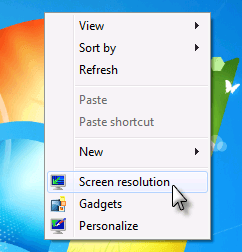
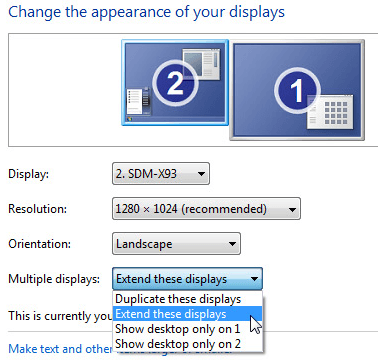
The second way is to right-click on the desktop and choose Screen resolution.

multiple monitors windows 7

Now you’ll see the familiar 1 and 2 to distinguish which monitor is which. There are several options and under Multiple Displays, you can choose from the same options as when you pressed Win + P.

setup multiple monitors windows 7

That’s it! You can also change the orientation of the displays and change the resolution of each display. It’s pretty straight-forward in Windows 7 and a lot easier!

Apart from this if you are extending your desktop then you can chose the location of your second display. That would decide the movement of the mouse. Suppose you keep the second display on right then moving the mouse beyond the right edge takes the cursor to the secreen 2. Similarly u can keep the second screen either in left or right or top or even bottom.

My Cool Collection

100219-152205

I have always wanted to have a cool collection of cool T shirts… So far so good. Following is a part of my collection which have been bought from various sources like Bluebustees, Street Shops, Malls, Loot mart etc… etc…  and a new latest avenue known as the Sheepstop. The latest entries in my collection are the ones by Sheepstop. These are good T shirts and also feel good too… Organic Cotton aha… Dont know what it is but feels good to wear 🙂

The Bird, The Book and The Buzz

There were days when I was happy with my phone and email, conversing with my friends and sharing updates of my blogs very frequntly. Then came this new bird on the block. This birdie promised to deliver your updates to several people, sounded cool, so I got a birdie for me. This little birdie was able to carry a small snippet of just 140 charchters but that served the purpose very well. This birdie also helped several url shortners to grow. Indeed the Birdie helped people alot. The Angel Birdie.
This angel had so many hidden powers that other tried to imitate the birdies power as and when these powers became apparent.
First on the line was The Facebook, which had started as a web based yearbook for schools and colleges. They tried to match the birdies features feather by feather and also added in some more colorful feather from Raven of likeness and commenting. They came up with a book which allowed you to write messages in themagical cyber ink and those messages automatically appeared on the pages of your friends books as if by magic.
While the birdie was busy delivering updates to people and the book was overflowing with likes and comments some one was watching the birdie fly high and Facebook spread worldwide through their wonderful goggles riding their own wave of happiness. But some flaw in their surfboard didnt allow them to qualify for the race.

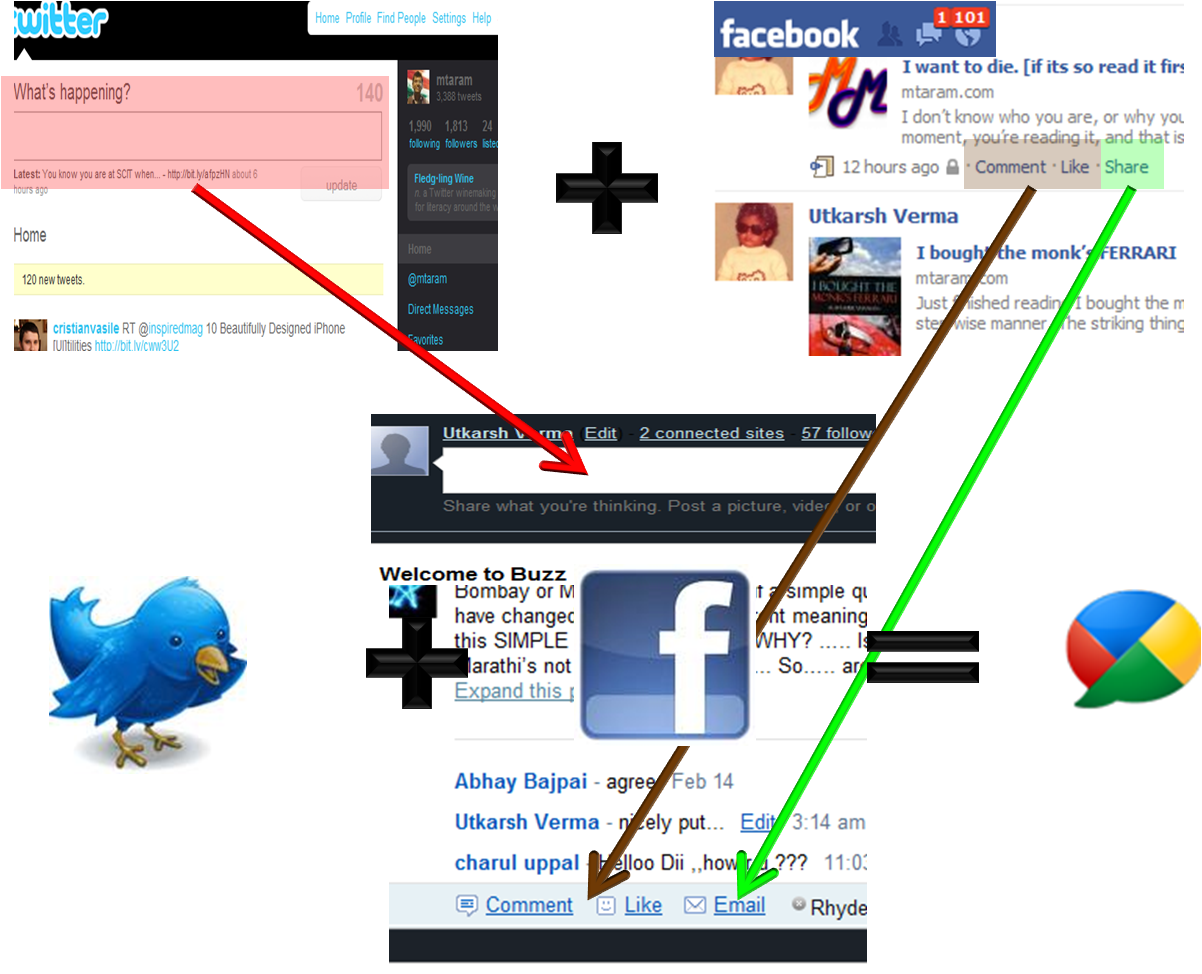
But these people, the cool people, they are too good and believe me they really are. If you have seen a computer and haven’t heard about them then you must be some ALF [read Alien Life Form]. These people with colorful shaded have always been following the funda of getting the intel from the successful people if they are behind schedule. They did this the very first time for their most succesful Ad based revenue model of the wolrd till date. [If you still havent got it, we are talking about Google and Overture.] Now we have tried to make a crude model to show you all that how they did it.

twitter+fb=buzz

They took the best pieces from everywhere and made the huge <ding> ahh … The Buzz. This buzz allows you to post to lenghts that make you happy, seriously way large post compared to 140 of our little birdie and 420 of the Book and the best part is you get it delivered in you inbox.
This is just the begining and as someone had said that this internet will change the way the economies work, markets dictate terms and people interact with each other. We guess the time has come for us to witness a new phenomenon.
Lets all wait and watch and we at MtaraM would be bringing you more from The Birdie, The Book and The BUZZ.