All posts by Utkarsh

Solution designer with Firstsource solutions. A post grad in Networks and IT Infrastructure. Technology enthusiast, blogger, webdesigner, Network security aspirant and in love with electronics and gadgets. This blog is an attempt to share what I find interesting... almost anything @Mtaram on twitter and

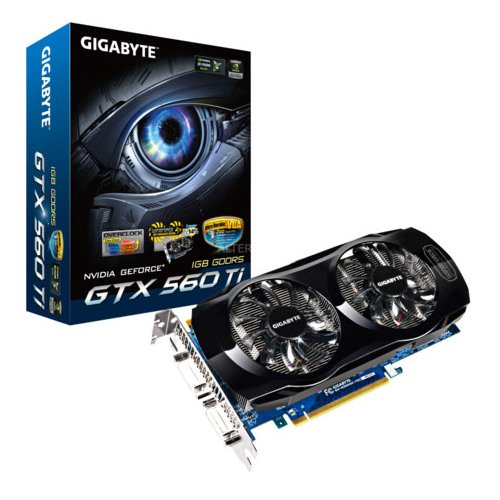
NVIDIA launches GeForce GTX 560 graphics card

http://i1-news.softpedia-static.com/images/news2/NVIDIA-GT-560-Not-Official-but-Already-Selling-Courtesy-of-Gigabyte-2.jpg

Nvidia launched its GeForce GTX 560 Ti graphics card recently but for people who don’t have $250 or so to buy a new graphics card, Nvidia has a new product that might be more to your liking. The company announced today that it has launched its GeForce GTX 560 card which is priced at about $199. The card is available for sale now via a number of different third party graphics card makers.

Nvidia says the GeForce GTX 560 will be able to handle things like PhysX-based game physics effects, 1080p resolutions and Nvidia’s 3D Vision all with the lower price point. To prove it, it released a video showing off the GTX 560 running three games. One is the previously released fantasy MMO game Rift, but the other two games are the currently unreleased Duke Nukem Forever and Alice Madness Returns.

The video shows off part of the beginning of Duke Nukem Forever running on the PC which will be the only version of the game that will support 3D via Nvidia’s 3D Vision glasses and supported monitors. In the Alice: Madness Returns sequence the video shows how the game benefits from Nvidia’s PhysX game support with a number of graphical and physics effects that are not present when PhysX support is turned off.

In addition to the new graphics card Nvidia has also released new beta drivers for all of its GeForce graphics cards. The R275 beta drivers boosts performances in a number of games including recent titles like Crysis 2, Bulletstorm and Portal 2. It also adds 3D Vision support for a number of current and upcoming games like Duke Nukem Forever, Age of Empires Online, Dungeon Siege III, Portal 2 and more.

5 must have Android utilities

Android has a long lasting list of applications that can be used for this and that and what not. I have been trying various applications for my droid and some of them have been really awesome. Listed below are the 5 such applications that I found amusing as well as productive.

IP Webcam

https://ssl.gstatic.com/android/market/com.pas.webcam/hi-256-1-f73963e1d2a95e397af40cf510f17624d331feb5I came across this application when my XPS 1210’s cam went bad and I needed one more camera. This application connects to the Wifi network and broadcasts the video.


Whats APP

https://ssl.gstatic.com/android/market/com.whatsapp/hi-256-2-063cf3e73115676edd923ec74bb8f17ff93570baWhats App lets you chat to your friends whether they are on blackberry or OVI or any other service. Just add your friends and be ready to chit chat. It also supports group chat now.


Barcode Reader

https://ssl.gstatic.com/android/market/com.google.zxing.client.android/hi-256-0-a52603e4bfdf6e9176c504ee305bdde8c5825288This application is very amusing. It helps save lot of time in case you see some application online with the QR code. Just point your barcode reader to the code and it opens up in the market app on the phone.


Distance Calculator

https://ssl.gstatic.com/android/market/com.gebogebo.android.distancecalcfree/hi-256-0-7ea3f3f86fc5a307e16fad219cf2df89fc09c14bThis application uses GPS to measure the distance traveled along with the speed. It can measure the distance while walking, cycling and driving. This application is just for the sake of curiosity, to know how fast you are going.


Tiny Flash Light + LED

https://ssl.gstatic.com/android/market/com.devuni.flashlight/hi-256-0-fbd9acaaaa348d40833d6b3813635f4e1e8cb93cThis application is a good utility as well as some serious fun too. It turns the phones screen into a flash light. It also has various other modes which allow you the have fun.

Measure speed and distance travelled with Android

https://ssl.gstatic.com/android/market/com.gebogebo.android.distancecalcfree/hi-256-0-7ea3f3f86fc5a307e16fad219cf2df89fc09c14bThe Distance Calculator is a nice app to have a rough estimate of how fast you are going or how long have you gone. It tracks the speed and distance in 3 modes, walking, cycling and driving. It is a nice app to give a shot.

Features:
– calculates distance while you are walking, biking and driving
– calculates average speed, current speed and total time while calculating distance
– “capture” feature enables you to take a screenshot of your recent trip. this screenshot can be shared with your friends using networks like twitter/facebook (file manager like Astro File Manager is required)
– runs in background and hence is not interrupted by other activities
– “Pause/Resume” functionality to allow you to save battery if you happened to stop for some time while walking, biking or driving
– gives you an option to select action to optimize battery performance


https://ssl.gstatic.com/android/market/com.gebogebo.android.distancecalcfree/ss-1-320-480-160-2-2919e9b7c3003bf0f87b03e534bf82f47e000bedWarning: Be careful while using this app. Numbers shown by this app are as accurate as GPS in your phone. Do not get distracted by this app while walking, biking or driving.

Get this application from the Android market. Point your bar code reader to this QR code.

http://qrcode.kaywa.com/img.php?s=5&d=https%3A%2F%2Fmarket.android.com%2Fdetails%3Fid%3Dcom.gebogebo.android.distancecalcfree%26feature%3Dsearch_result

Measure any distance with a single click on your android

Surveyor is an android application that can help you measure distances with the help of camera and orientation sensors on your phone.

It uses data from orientation sensors and the camera image to determine 3D coordinates of the object you selected and then give you the distance from the object to you or another object.

All you have to do is simply point your phone to the object and then click its video image on the screen at the point where that object touches ground. Detailed guidance have been integrated in the Surveyor application for your convenience.

However the simplicity comes with 2 limitations:

1. It can only measure distances on a flat level surface, sloped or vertical surface won\’t work.
2. The altitude from the level surface to the device should be given to Surveyor as parameter. If a wrong altitude is set, the result will not be accurate.

Surveyor is a freeware, you can download it from Android Market by searching “surveyor” or click on the following link when you are viewing this page on the phone.

Get Surveyor from Android Market

http://qrcode.kaywa.com/img.php?s=5&d=https%3A%2F%2Fmarket.android.com%2Fsearch%3Fq%3Dpname%3Acom.miian.android.surveyor

Google Takes Office Space Battle To Microsoft

http://www.wired.com/images_blogs/epicenter/2011/05/samsung-td-640x485-300x227.pngGoogle lifted the veil on its chrome laptop Wednesday and also launched a somewhat Quixotic initiative to dent Microsoft’s dominance in the enterprise with a program that provides software, laptops and support for $28 per month per user.

As Apple continues to make modest advances in the office now Google wants a piece of the action and is offering up an IT-displacing idea that seeks to emphasize peace of mind as much as it does price.

The idea is simple. Businesses spend a lot of money on IT support, hardware and software — the core of which is commodity computers running a flavor of Windows OS and Microsoft Office. They hold on to computers as long as they can both for reasons of cost and to simplify support, which generally is provided locally through the IT department.

Google’s alternative provides small, standardized laptops from Samsung and Acer running its Chrome OS, which debuted in December. The new Chromebooks, as Google dubbed them, are fully web-based — both programs and storage is “in the cloud.” Users have access to use a wide range of productivity software, like Google Docs, Salesforce CRM and photo editing software, with no installation or and upgrades automatically performed in the background. Google provides all support, including repair and replacements.

Google has made less ambitious plays for the enterprise before. It’s first attempt the paid version of Google Docs, has had some success with smaller businesses, but hasn’t turned into a significant revenue source for Google. And, given its Nexus One past, Google it isn’t exactly known for its customer service.

But diversification is seen as key for the search giant, since its core advertising products are still responsible for more than 90 percent of its revenue. So we see a push into the mobile space with Android — a direct blow at Apple’s smartphone and tablet business — and a challenge to Microsoft in its workplace wheelhouse.

Smartphone Market Share


Smartphone market shares as of March 2011. Source: The Nielsen Company

Not surprisingly, the current shares in the smartphone market reflect that same relationship as these consumer-preference scores. Android handsets dominate with 37% of the market, iOS is currently the second most popular with 27%, and RIM is third with 22%.

But consumers are fickle. Will the release of the next iPhone flip those numbers in Apple’s favor, or will Android gain a large enough foothold that it will dominate for the foreseeable future?

Demystifying Hi Speed Thunderbolt Interface


File:ThunderboltIO.jpgThunderbolt (originally codenamed Light Peak) is an interface for connecting peripheral devices to a computer via an expansion bus. Thunderbolt was developed by Intel and brought to market with technical collaboration from Apple Inc. It was introduced commercially on Apple’s updated MacBook Pro lineup on February 24, 2011, using the same port and connector as Mini DisplayPort.

Thunderbolt essentially combines PCI Express and DisplayPort into a new serial data interface that can be carried over longer and less costly cables. Because PCI Express is widely supported by device vendors and built into most of Intel’s modern chipsets, Thunderbolt can be added to existing products with relative ease. Thunderbolt driver chips fold the data from these two sources together, and split them back apart again for consumption within the devices. This makes the system backward compatible with existing DisplayPort hardware upstream of the driver.

Apple’s iMac 2011 showed that this compatibility is limited to the video output, as video input is incompatible with DisplayPort and mini-DisplayPort devices, and only allow Thunderbolt-equipped computers to send a video signal to 2011 iMac’s through Thunderbolt cables, exclusively, breaking compatibility with existing DisplayPort and mini-DisplayPort equipped computers.

The interface was originally designed to use flexible optical fiber cables, but a version using conventional copper wiring was also developed to furnish the desired 10 Gb/s bandwidth at lower cost. Intel’s implementation of the port adapter folds Thunderbolt and DisplayPort data together, allowing both to be carried over the same cable at the same time. A single Thunderbolt port supports hubs as well as a daisy chain of up to seven Thunderbolt devices; up to two of these devices may be high-resolution displays using DisplayPort. Apple sells existing DisplayPort adapters for DVI, dual-link DVI, HDMI, and VGA output from the Thunderbolt port, showing broad compatibility.

Samsung Retina-Resolution Tablet Display

http://www.wired.com/images_blogs/gadgetlab/2011/05/pentile-subpixels.png

Samsung has a new 10.1-inch “retina” resolution LCD panel ready to show off next week. It will demonstrate the 2560 x 1600 panel at the SID Display Week 2011 International Symposium starting Tuesday May 17th. And if you weren’t already thinking it — yes, this is perfect for tablets.

The panel has a resolution of 300dpi, the same as that of print, and the number Apple uses to define its Retina displays. In most uses, the pixels disappear and it appears that you are looking at a printed page.

Samsung’s new panel is interesting for two reasons. First is that it uses PenTile RGBW tech. PenTile is a way of grouping subpixels — each multicolor “pixel” on a screen is made up of several smaller single-color dots. In the case of PenTile, there are five dots (hence the “pent” or “penta” part of the name). The RGBW part means that an extra white pixel is added to the usual red, green and blue ones.

This white pixel works in conjunction with a variable, locally dimming backlight. This ramps up when bright colors are needed, but when colors are desaturated or just black and white, the backlight dims and only the white pixel is switched on. This reduces power consumption by a claimed 40% vs. a regular RGB stripe panel.

And that power reduction is the key to its use in tablets. The biggest draw on tablet battery power is the screen. Until a panel exists that can deliver the same battery life as today’s tablets, we won’t see a Retina display in the iPad. Of course, driving all of those extra pixels is also extra work (4x) for the graphics chips, but that’s another problem.

Google “News Near You”

http://www.unbeatable.co.uk/images/uploaded_images/google_news.png

Google has long let you look up local businesses on its mobile search page, leveraging the location services features on smartphones. Friday, they added local news.

The address is the same — news.google.com — and the sources are those already available via Google News. But now you are prompted to agree to share your location, rather than punch in a zip code or locale name on the personalized landing page.

the discovery engine doesn’t just leverage your location to tap into local sources for news, it also find stories about your location from publications that aren’t near you.

This HTML5 web page is super fast, and is utterly configurable except that you can’t bury “Top News”


Facebook attack on google unveils its own privacy flaw

http://www.wired.com/images_blogs/epicenter/2010/05/facebook_glasses_2-660x523.jpgFacebook was griping that Google is getting information about its users without permission. But some information that users share with Facebook is available publicly, even to people who aren’t their friends in in their social networks – or even are members of Facebook. It’s not because outsiders raided the service and exposed that information. It’s because Facebook chose to expose it.

Facebook used to have an implicit promise with its users. Basically the deal was what goes on Facebook stays on Facebook. But over the past couple of years Facebook has chosen to alter the deal. Certain profile information became available outside of Facebook, easily searchable via Google and other means. (Users can opt out of showing this but relatively few do.) Some of that profile information includes a few of the people on the user’s friend list. By repeatedly pinging public profiles, it’s possible for Google or anyone else to figure out pretty much all your friends.

This information is a lot easier to unearth from inside Facebook, but actually logging into Facebook to purloin information would indeed be troublesome. For one thing, it would violate the terms of service agreement. Is Google doing this? One of the Burson operatives implied that it is. But Google says the company does not go inside Facebook to scrape information, and I find this credible. (If Facebook has logs to prove this serious charge, let’s see them.)

When Google launched Social Search, it also said specifically that it was not going to learn about Facebook connections by mining the Web as described above. Just how Google does get Facebook information is complicated, much of it seems to be by permission.

But even if Google did scrape information from the public web, would that be so bad? You can argue whether or not Google would be crossing a privacy line by doing this. (And, remember, Google says it is not mining that public information.) But it’s an argument with a pro and con. What you cannot argue is that is not Google but Facebook that puts some Facebook information into the open Web.

That is why Facebook’s campaign is so weird. If outsiders are going to examine how third-party companies get information about Facebook’s users, you can’t help but question why some Facebook information, by default, shows up on the open web.

via Wired.

image: Wired.