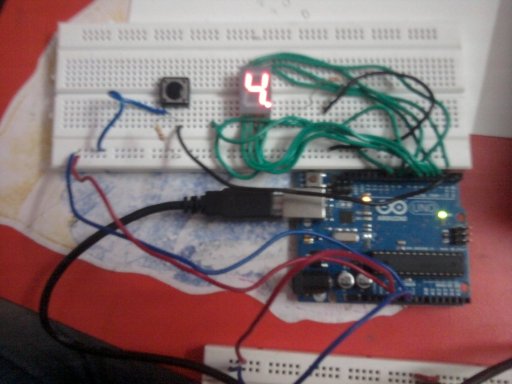
I have been waiting to play with embedded programming since and recently ordered an Arduino. I tested the spare LCD and displays with the normal tutorial commands and went step by step remeber the thing about slow and steady!
I want to build a vector LASER projector and a quadrocopter someday but that is too far. It is kind of my VISION. My Mission is to learn embedded programming via arduino.
It is one hell of a kit.
My very first experiment was a 7 segment dice.
It is a very simple project. Doenst require much and all the thing were in the kit that I ordered.
Still following is the list of what I used:-
- Arduino Uno
- 7 segment display RED
- Breadboard
- Jumper wires
- Push Button switch
The schematics for the display and Arduino I/O used by me are as follows


| Arduino Pin | 7 Segment Pin Connection |
| 2 | 7 (A) |
| 3 | 6 (B) |
| 4 | 4 (C) |
| 5 | 2 (D) |
| 6 | 1 (E) |
| 7 | 9 (F) |
| 8 | 10 (G) |
| 9 | 5 (DP) |
I used a normal routine from one of the websites to cycle through the numbers 0 to 9.
Then I reduced the delay to have the numbers roll faster and faster.
Then I reduced the count from 9 to 6 (a dice has only till 6 and 0 was left just for fun).
Then I added a push button and added in the code to detect the state of the button.
When the button is pressed the state of the pin goes LOW and at that point I had programmed the loop to display the dot and pause for 2 seconds.
CATCH: The numbers scroll so fast that all we see is scrolling segment. And when the button is pressed the current number just paused for 2 seconds and then it starts again.
No random number generation 🙂
Video of the thing in action
source code (modification of sample code)
[code]
// Arduino 7 segment display example software
// http://www.hacktronics.com/Tutorials/arduino-and-7-segment-led.html
// License: http://www.opensource.org/licenses/mit-license.php (Go crazy)
// Define the LED digit patters, from 0 – 9
// Note that these patterns are for common cathode displays
// For common anode displays, change the 1’s to 0’s and 0’s to 1’s
// 1 = LED on, 0 = LED off, in this order:
// Arduino pin: 2,3,4,5,6,7,8
int inPin = 1;
int val = 0;
byte seven_seg_digits[10][7] = { { 1,1,1,1,1,1,0 }, // = 0
{ 0,1,1,0,0,0,0 }, // = 1
{ 1,1,0,1,1,0,1 }, // = 2
{ 1,1,1,1,0,0,1 }, // = 3
{ 0,1,1,0,0,1,1 }, // = 4
{ 1,0,1,1,0,1,1 }, // = 5
{ 1,0,1,1,1,1,1 }, // = 6
//{ 1,1,1,0,0,0,0 }, // = 7
//{ 1,1,1,1,1,1,1 }, // = 8
//{ 1,1,1,0,0,1,1 } // = 9
};
void setup() {
pinMode(2, OUTPUT);
pinMode(3, OUTPUT);
pinMode(4, OUTPUT);
pinMode(5, OUTPUT);
pinMode(6, OUTPUT);
pinMode(7, OUTPUT);
pinMode(8, OUTPUT);
pinMode(9, OUTPUT);
pinMode(inPin, INPUT); // declare pushbutton as input
writeDot(0); // start with the “dot” off
}
void writeDot(byte dot) {
digitalWrite(9, dot);
}
void sevenSegWrite(byte digit) {
byte pin = 2;
for (byte segCount = 0; segCount < 7; ++segCount) {
digitalWrite(pin, seven_seg_digits[digit][segCount]);
++pin;
}
}
void loop() {
for (byte count = 6; count > 0; –count) {
delay(10);
val = digitalRead(inPin);
if (val == LOW)
{
writeDot(1);
delay(2000);
writeDot(0);
}
sevenSegWrite(count – 1);
}
delay(0);
}
[/code]