• Log In
  • Register
Mtaram's Daze
  • Home
  • About me
    • Friends
    • iLike
  • Abstract
    • Color
    • Intellect
    • Pain
    • Poems
    • Success
  • Computers
    • Applications
    • Computer Troubleshooting
    • hardware
    • Security
      • Information Security
    • windows
  • General
    • Environment
    • Events
    • Finance
    • FUN n TP
    • How Tos
    • News
    • Reviews
    • Sidebar Photoblog
    • Sports
    • Work
  • Hacking
    • My Hacks
  • Internet
    • Google
    • Search
  • Mobile
    • Android
    • Apps
  • Social NW
    • Blog
    • Facebook
    • Twitter
    • Wordpress
  • Technology
    • Arduino
    • Gadgets
    • Gaming
  • 3 in 1 Search!
  • About US
  • RSS
  • May 20, 2013
  • SMS Updates

Facebook privacy controls

‹‹‹ Previous Post Next Post ›››
July 29, 2011
By Utkarsh

Facebook allows you to share almost anything and everything with your friends. But what if some day you get a friend request from your Boss, you cant say Ignore and you also don’t want to accept. Here comes the role of Facebook privacy controls. You can customize them such that you can have things hidden from who ever you want on an individual or group basis.

Controls can be set for individuals but it is better if all the Facebook friends are grouped into various lists as Facebook prefers to call them.

Following is a step by step walkthrough to do it.

Login to Facebook.
image

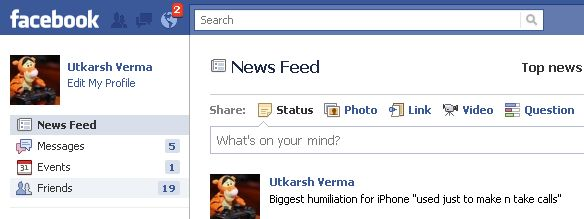
Click the Friends tab on the left column as shown above. This would take you to the all friends list.
image

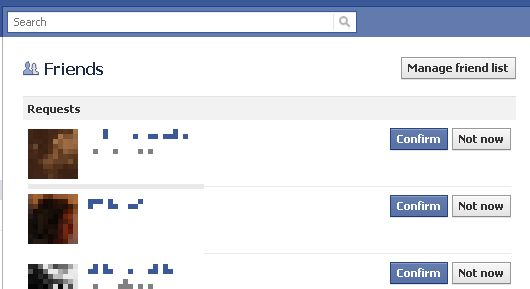
Click manage Friends List on the top right corner. This would lead to all the lists that you have made of friends, colleagues etc. as shown below.

image

If needed you can also create a new list by clicking the button create list which is on top right (cropped out in the above depiction)

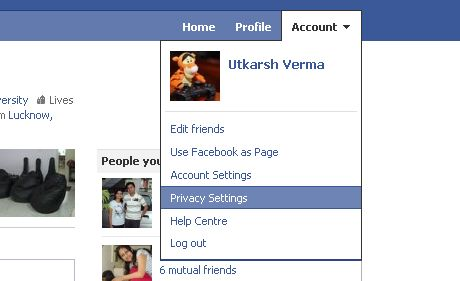
Once you have your lists in place head over to account management.
image

Go to Account >> Privacy Settings.

This would take you to a page which shows the summary of current privacy controls in place.

Here you can configure what you want to show to who. Following will be just an example and you can customize everything in the same manner as shown.
image

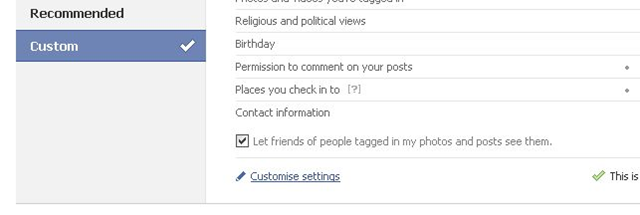
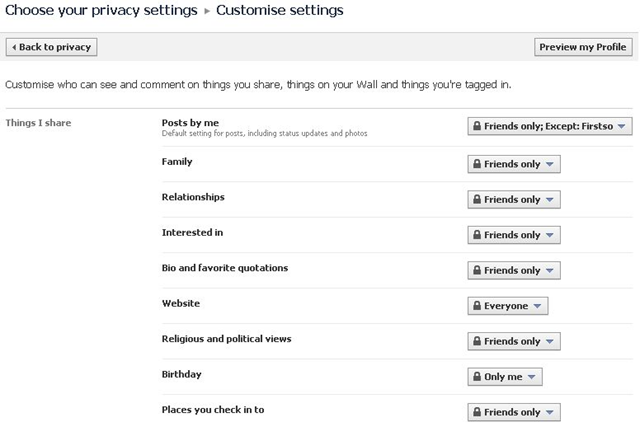
Click Customize to go to the individual controls page.
image

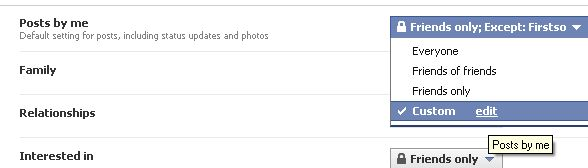
Here you can Customize privacy controls for Things shared by you and others and contact related details. The following examples shows it only for posts. Rest can be done in same way.
image

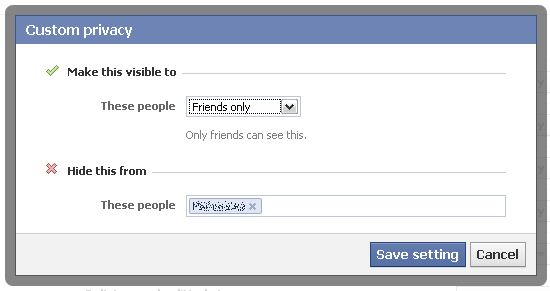
Click on the tab to open the drop down and click edit to customize. This brings up the following popup.
image

Here you can select the setting from the drop down for who to show and to hide the updates just type in the friends name or the list name in the below “Hide this from” section.

Save settings and you are done.

This same can be done of all kind of updates.

Do let us know if this was of any help to you. :)

Tags: facebook, facebook privacy, privacy, privacy controls

‹‹‹ Previous Post: Speak Asia COO Tarak Bajpai in police net Next Post: SEO Hosting ›››

You might also like

Facebook attack on google unveils its own privacy flaw Facebook was griping that Google is getting information about its users without permission. But some...
Facebook face recognition and how to disable it Facebook has been rolling out a facial recognition feature that makes it easier to tag friends in...
Facebook vs Orkut I was no fan of online social networking till the early days of my college because I had so many real...
Bing Facebook relation getting stronger Bing announced that it has integrated Facebook Likes within its regular search results, similar to a...
Grab This Widget

Line Break

Author: Utkarsh (473 Articles)

Solution designer with Firstsource solutions. A post grad in Networks and IT Infrastructure. Technology enthusiast, blogger, webdesigner, Network security aspirant and in love with electronics and gadgets. This blog is an attempt to share what I find interesting... almost anything @Mtaram on twitter and Google+

2 Responses to “ Facebook privacy controls ”

  1. Gajendra Singh on July 29, 2011 at 3:31 pm

    Quite informative. Screenshots were really helpful. Thumbs Up!

  2. Utkarsh on July 29, 2011 at 5:41 pm

    Thanks friend :) Keep visiting for more.

Leave a Reply

Click here to cancel reply.

Opt out of 'Thank You' e-mails..


Blogroll

  • Aima's blog
  • Anant Srivastav
  • Chatter That Matters
  • Computer Tricks and Tips
  • Harsh Ajmera's Blog
  • Life is Beautiful!!
  • Open Source Innovation
  • POET'S NOOK
  • Tech by a Teen
  • The Cyber Nag
  • The IT Axis
  • Vandy's Blog
  • VinolXi


Copyright © 2013 Mtaram's Daze. All Rights Reserved.
335 ‘queries’